IPv4 edge proxy
Reach an IPv6-only origin from the IPv4 internet with a self-hosted edge — a box that owns a public IPv4, terminates the TLS, and reverse-proxies to the v6 origin over IPv6. A self-hosted equivalent of a Cloudflare proxy, no third party in the request path.
The most important promise first: a tenant site on its own dual-stack VPS never needs an edge. Its
A record points straight at it. The edge is only for things that live on a box with no public IPv4
of its own — an IPv6-only node: the panel, the docs site, the rare IPv6-only tenant
site. Everything below only matters for those.
Why this exists
IPv6-only nodes run the whole stack on a cheap "IPv6 Only" box with no public IPv4.
That works perfectly for outbound traffic — NAT64/DNS64 lets the v6-only box reach the v4 internet
(apt, GitHub, ACME, every upstream that's still v4-only).
But NAT64 is a one-way street. It solves egress (v6 box → v4 internet). It can never solve ingress (v4 client → v6 box), and nothing on the origin side can: if a client only speaks IPv4 and the origin only has an IPv6 address, there is simply no IPv4 address for the client to dial. A translator sitting next to the origin still can't hand a v4-only visitor an address. A meaningful slice of the internet is still IPv4-only — corporate networks, older mobile carriers, some home ISPs — and to them an IPv6-only panel, docs site, or tenant site is unreachable.
The edge proxy is the inbound-v4 lane. An edge is a small box that:
- owns a public IPv4 address,
- terminates the IPv4 (TLS) connection for a fronted hostname, then
- reverse-proxies to the IPv6-only origin over IPv6 (
reverse_proxy https://[origin]:443).
It's the same idea as Cloudflare's orange-cloud proxy — but self-hosted: its own box, its own Caddy, its own cert, no third party in the request path. Sovereignty- and GDPR-first, consistent with the rest of SpipCP.
Control plane is not data plane
The edge fronts live tenant traffic and does not depend on the panel being up. Once a route is enabled, the edge boxes serve the fronted hostname from their own Caddy + cert — the panel being offline never stops a live site from serving.
A nameserver is not a proxy
A point worth nailing down, because it's easy to conflate: a nameserver never carries traffic. DNS answers the question "what IP is this name?" and then steps out of the path — the client connects to that IP directly. "Cloudflare DNS vs self-hosted PowerDNS" is the wrong axis for this problem; neither carries traffic.
Passthrough — actually relaying the request to a different machine — is a reverse proxy, a different thing entirely. That's the edge. So describing the edge Caddy as co-located on the PowerDNS boxes is a deployment convenience (those two boxes are already running), not the nameserver "doing" the proxying. The nameserver resolves; the edge proxies; they happen to share a box.
Architecture
Two boxes, co-located on the nameservers already running. A v4-only client resolves the fronted hostname
to two A records (one per edge) and reaches the IPv6 origin through whichever edge answers; a
v6-capable client can skip the edge entirely via the optional direct AAAA.
                IPv4-only client
                       │  resolves panel.example.com → A 203.0.113.71  (+ A 198.51.100.72)
                       ▼
        ┌──────────────────────────────┐        ┌──────────────────────────────┐
        │  EDGE 1  (role {nameserver,   │        │  EDGE 2  (role {nameserver,   │
        │          edge})              │        │          edge})              │
        │  public v4 203.0.113.71       │        │  public v4 198.51.100.72      │
        │  Caddy: terminate TLS (LE)    │        │  Caddy: terminate TLS (LE)    │
        └──────────────┬───────────────┘        └──────────────┬───────────────┘
                       │  reverse_proxy https://[2a01:4f8:panel::1]:443  (over IPv6)
                       └──────────────────┬───────────────────┘
                                          ▼
                          ┌──────────────────────────────┐
                          │   IPv6-only ORIGIN            │
                          │   panel / docs / v6-only site │
                          │   AAAA 2a01:4f8:panel::1       │  (also published directly, optional)
└──────────────────────────────┘-
Co-located on the nameservers. The two PowerDNS boxes already running also run the edge Caddy. A node carries a set of roles, so one box is
{nameserver, edge}at once — no new boxes, one small fleet, two redundant v4 front doors. Anedgebox hosts no tenant instances or sites (it carries no Incus / tenant network fabric, same asnameserverandstorageroles). -
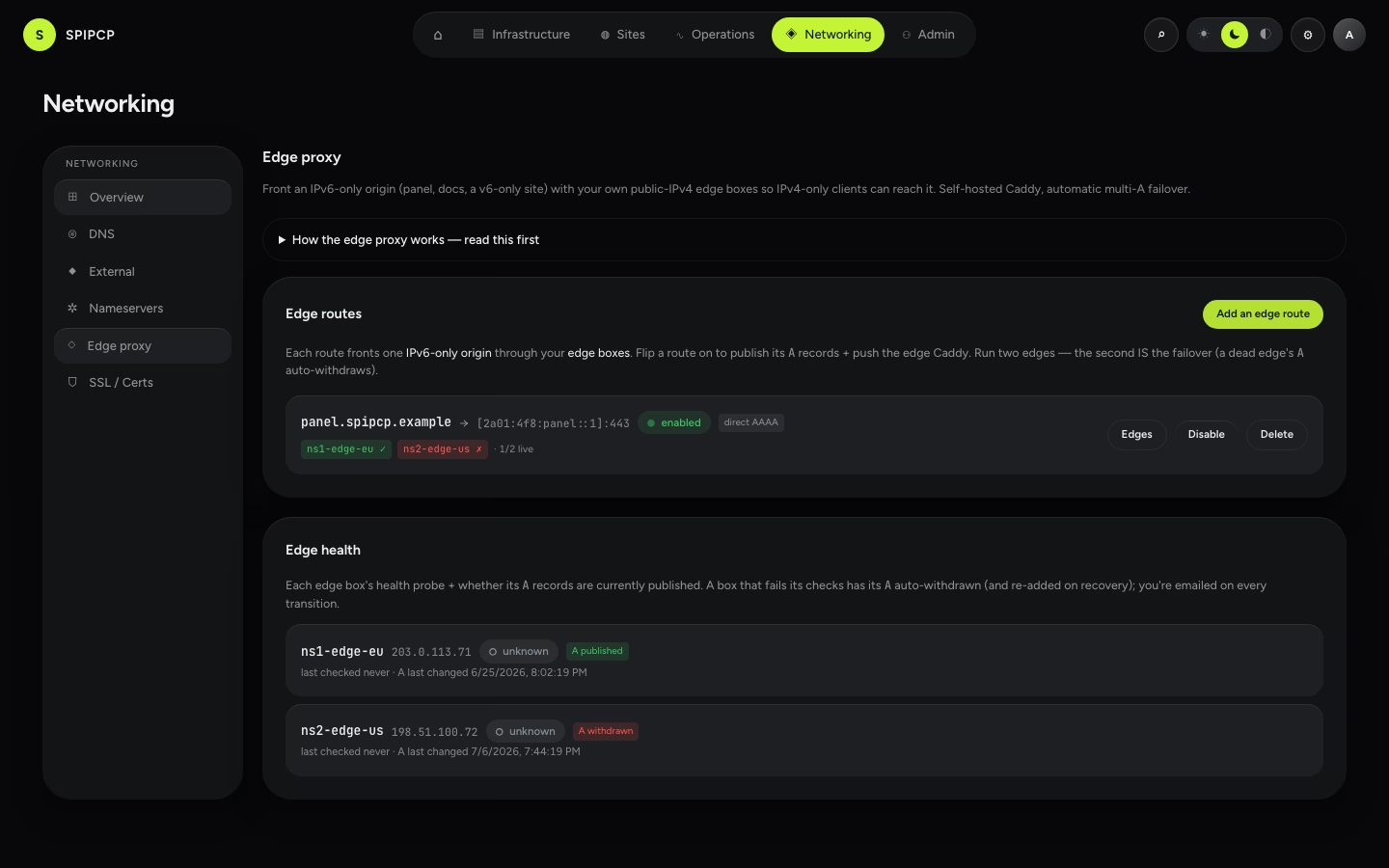
Multi-A by default. For a fronted hostname, SpipCP publishes one
Aper assigned edge's public v4 — so with two edges, bothArecords land. Clients happy-eyeball across the set; if one edge is slow or down, the client tries the other. (Publishing a singleAwould make the second edge decorative.) -
Direct
AAAAfast-path (optional, on by default). When the origin is an IPv6 literal, the route also publisheshostname AAAA <origin v6>. A v6-capable client then reaches the origin directly and only IPv4-only clients traverse the edge. Toggle per route (publishDirectAaaa). -
TLS terminates at the edge, re-terminates to the origin. The edge owns the public cert (Caddy + Let's Encrypt over its own v4). It dials the origin over HTTPS (
reverse_proxy https://[origin]:443), so it's TLS end-to-end, not a blind TCP pass-through. The origin keeps its own internal cert. (TLS pass-through / SNI routing, where the origin owns the public cert, is out of scope for now.) -
Health-checked failover. Each edge gets a heartbeat probe (an HTTP check on its own
:443, reusing the standard probe runner — no parallel health sweep). When an edge fails enough consecutive checks, SpipCP automatically withdraws that edge'sAfrom every route it serves, and re-adds it once it recovers. It never withdraws the last edge (that would pull the hostname entirely) — instead it surfaces a critical alert. -
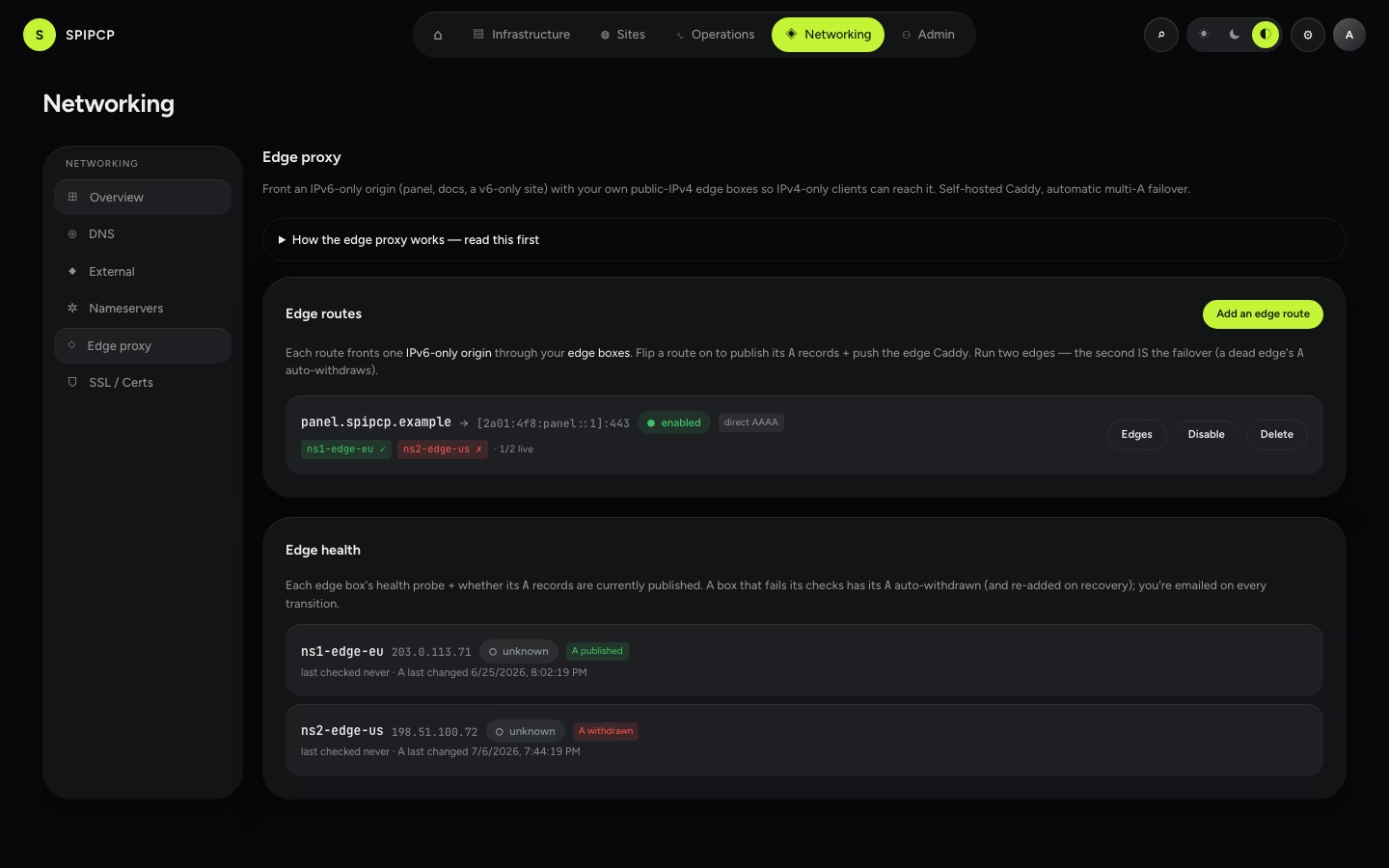
The per-origin enable switch. Each route has an
enabledflag, default OFF. Creating a route changes nothing until it's deliberately flipped on — a per-hostname choice, for the "might get v4 on this box someday" case. Off = served however it was before (direct v6); On = fronted.
Step by step
1. Enroll an edge node
Enroll the box with the edge role. Because the edge co-locates on a PowerDNS box, enroll it as
{nameserver, edge} — it runs PowerDNS and the edge Caddy. An edge box:
- builds on the shared hardened base only (UFW + fail2ban + sysctl + sshd) — no Incus, no tenant network fabric (it hosts no workloads);
- installs the same official Caddy the standard node's edge uses (one Caddy install path in the codebase);
- opens UFW
:80+:443(the public front door —:80for the ACME http-01 challenge and the:80→:443redirect,:443for the terminated TLS). Everything else stays default-deny; - is "done" only when Caddy is active and its admin API answers on loopback
:2019— the panel pushes each box's site config over that admin API (the same/loadpath standard nodes use; no SSH).
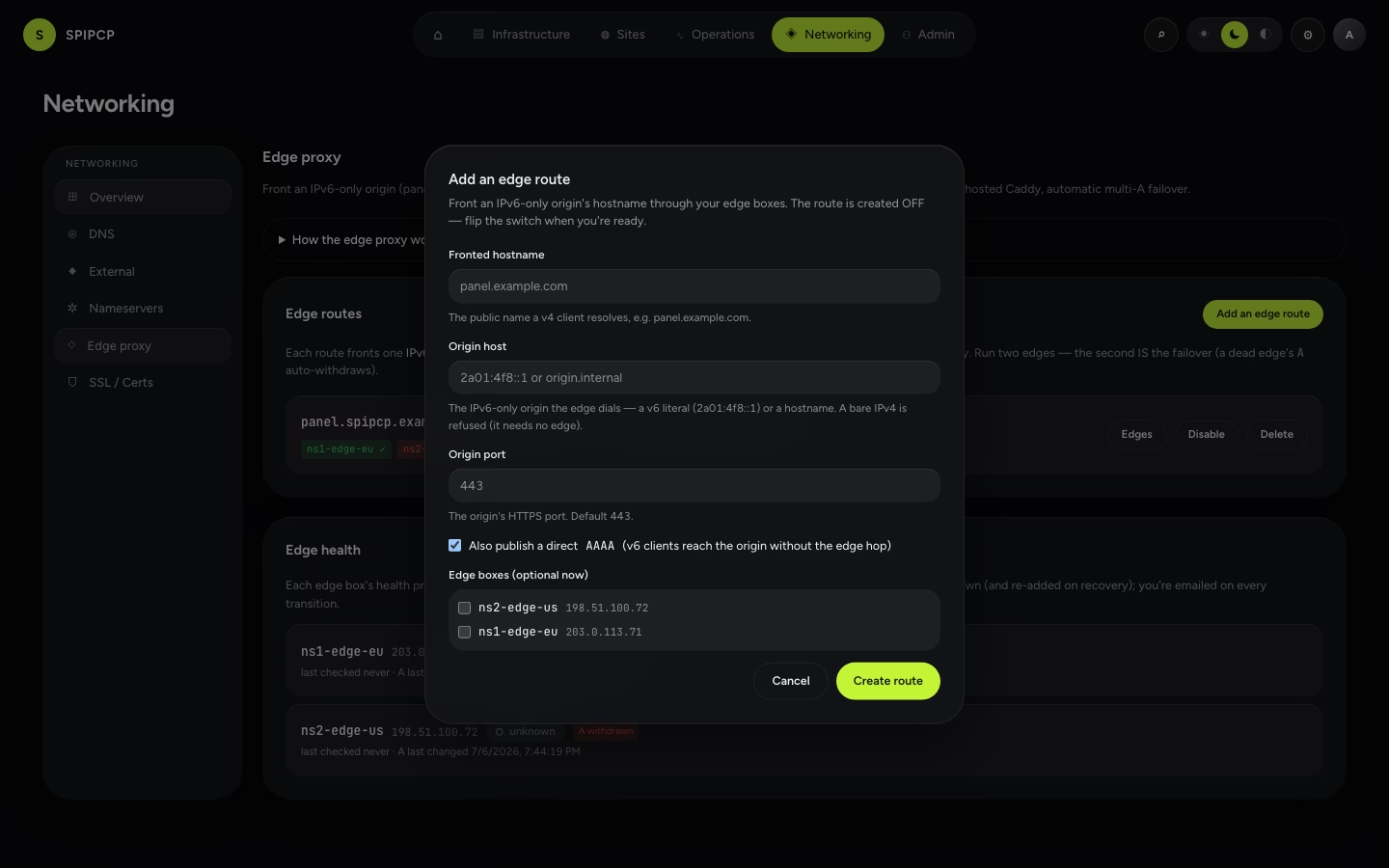
2. Create an edge route
Create a route mapping a fronted hostname → its IPv6-only origin:
| Field | Meaning |
|---|---|
hostname | The public name a v4 client resolves (e.g. panel.example.com). |
originHost | The IPv6-only origin: a v6 literal (2a01:4f8::1) or a hostname. A bare IPv4 literal is refused — a box with a v4 needs no edge. |
originPort | Defaults to 443. |
publishDirectAaaa | Default on — also publish the direct v6 fast-path. |
A new route is always created disabled — nothing changes in DNS or Caddy yet. Permissions match
self-hosted DNS zones: reads gate on DOMAINS_VIEW, writes on DOMAINS_MANAGE.
3. Assign the serving edges
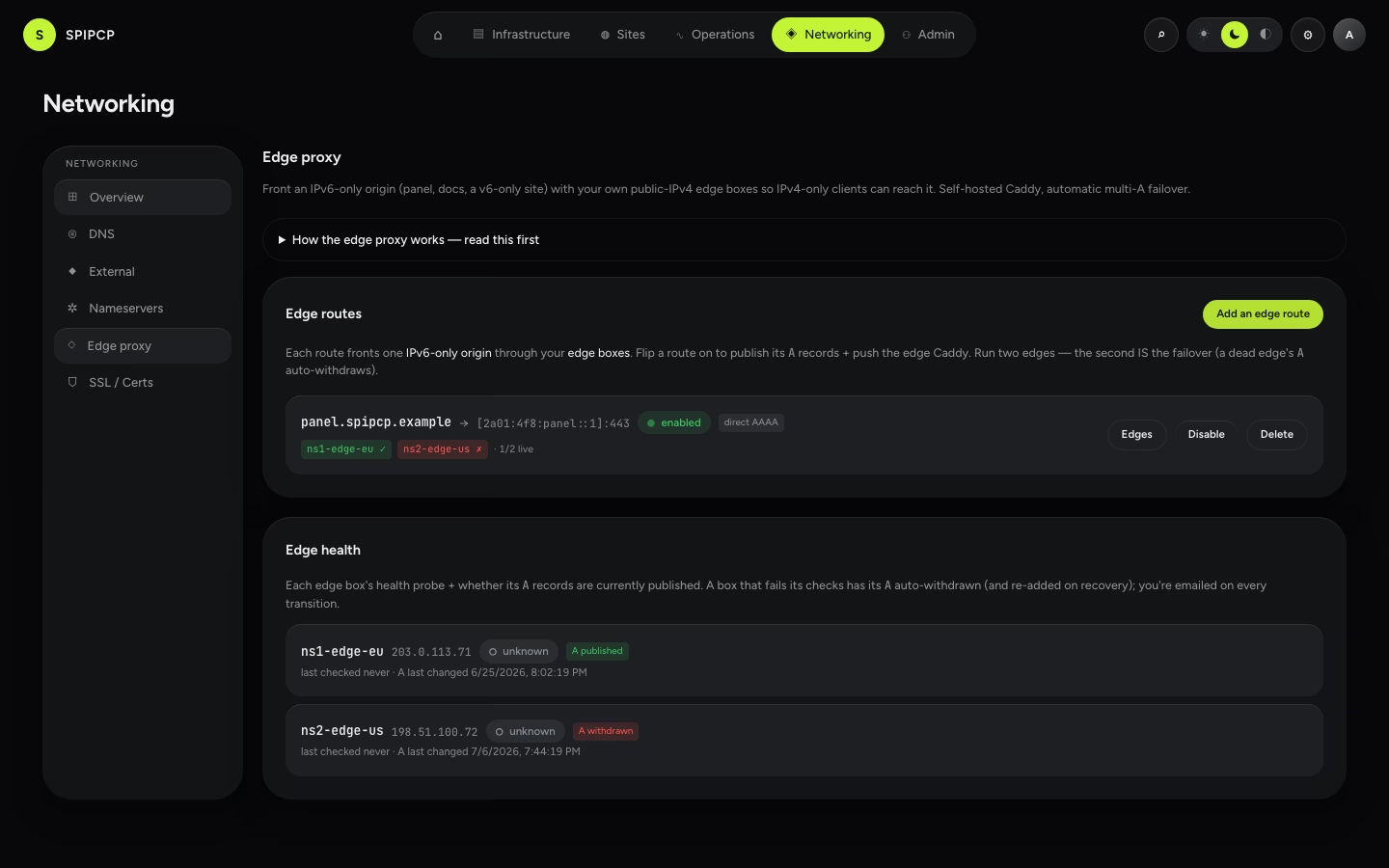
Assign the route's serving boxes. Every id must resolve to an enrolled edge-role node — a non-edge
or unknown id is refused with an actionable message. Assign both edges so the route gets two A
records.
4. Flip the enable switch
Enabling refuses a route with no assigned, live edge node (an honest failure — never a route fronted by nothing). On enable, SpipCP reconciles the derived world:
- Caddy — each edge box's config gains a site block for
hostnamethat terminates TLS (Let's Encrypt over the edge's v4) and reverse-proxies tohttps://[origin]:port. Pushed to every serving edge over the admin API. A box with no enabled edge routes generates byte-identical Caddy to before — the edge branch is purely additive. - DNS — through the PowerDNS fan-out:
hostname A <edge1 v4>andhostname A <edge2 v4>(both edges), plushostname AAAA <origin v6>whenpublishDirectAaaais on and the origin is a v6 literal. - Health probe — provision the per-edge heartbeat probe so failover can fire.
5. What DNS records result
For the example fleet (two edges + an IPv6-only panel origin):
panel.example.com.  300  IN  A     203.0.113.71      ; edge1 public v4
panel.example.com.  300  IN  A     198.51.100.72     ; edge2 public v4
panel.example.com.  300  IN  AAAA  2a01:4f8:panel::1 ; direct v6 fast-path (optional)
A v4-only client resolves the two A records and reaches the origin through an edge. A v6 client uses
the AAAA and reaches the origin directly.
6. How failover behaves when an edge dies
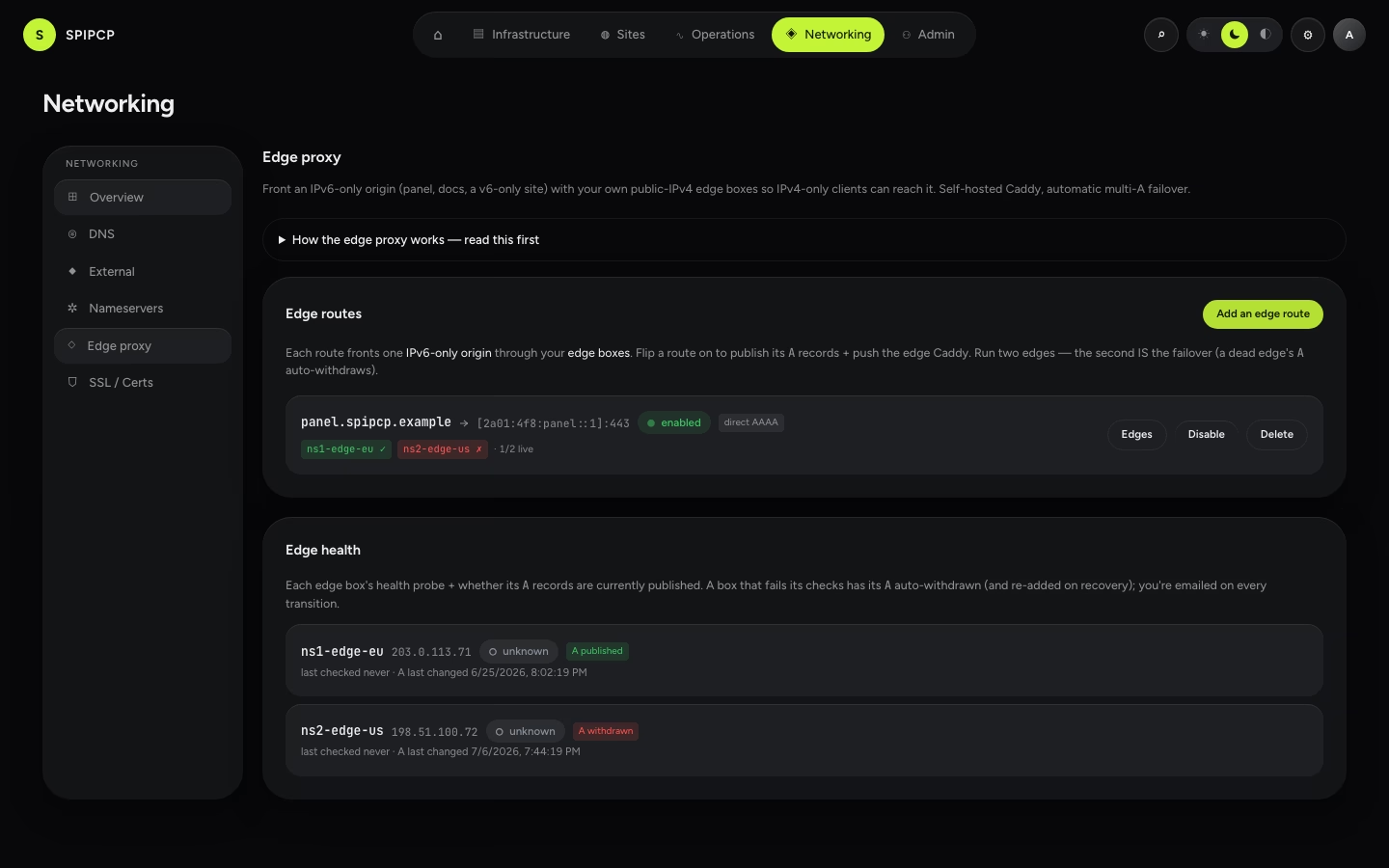
- The heartbeat probe on the dead edge fails its checks. After 3 consecutive failures (the default
threshold), SpipCP withdraws that edge's
Afrom every route it serves — leaving the other edge'sAin place. New resolvers stop handing out the dead edge; the hostname stays reachable over the survivor. - The state is durable (an
edge_healthrow): a worker restart never re-publishes a withdrawn edge'sA. - When the edge recovers and passes 2 consecutive successes (the default recovery threshold), its
Ais re-added automatically. The hysteresis (3 to withdraw, 2 to re-add) means a single blip never pulls DNS and a single good check never flaps it back. - This is "good enough" two-box redundancy with happy-eyeballs — not anycast/BGP/zero-second failover. Resolver TTL + client retry govern how fast a client notices.
7. What the notification says
Every transition emails and webhooks the operator through the existing probe-notify path (one operator SMTP setting, no second email stack) and writes an audit row. The severity is chosen from how many edges remain live:
| Severity | When | Example |
|---|---|---|
| warning | An edge withdrew but ≥1 edge still serves every affected route — still reachable over v4. | 🟠 Edge ns1-edge-eu down — A record withdrawn (other edges still serving) |
| critical | The last edge for a route withdrew — that hostname is now dark to v4-only clients. | 🔴 LAST edge ns2-edge-us down — panel.example.com unreachable over IPv4 |
| recovery | An edge passed its health checks again; its A was re-added. | ✅ Edge ns1-edge-eu recovered — A record re-added |
The worst-off affected route sets the severity: one unreachable hostname is an outage even if other routes are merely degraded.
8. Runbook — both edges down
On receiving the critical "last edge down" alert, IPv4-only clients can't reach the fronted hostname (v6
clients are unaffected if the direct AAAA is published). In order:
- Check the origin is actually up. The edges only proxy — if the origin is down, both edges health-check fine but serve 5xx. Fix the origin first.
- Check the edges. Both edge boxes' probes are
down. SSH in (break-glass) or check the host provider — is it a network outage at one location, both, or the boxes themselves? Two edges in two regions means a single-region outage shouldn't take both. - Bring at least one edge back. As soon as one edge passes its recovery checks, its
Ais re-added automatically and v4 reachability returns. No manual DNS edit needed. - Add a third edge if the two keep flapping together (correlated failure — same provider/region).
Enroll another
{nameserver, edge}box and assign it to the route. - The v6 fallback holds throughout. If the direct
AAAAis published, v6 clients keep working — so the outage is "v4-only clients can't reach it," not a total blackout.
The Cloudflare orange-cloud alternative
Self-hosting the edge is not mandatory. The fronted hostname can instead point at Cloudflare (orange-cloud / proxied DNS): Cloudflare owns the public v4, terminates TLS, and proxies to the IPv6-only origin. SpipCP supports this as a documented choice — it is not a dependency of any feature.
| Pick Cloudflare when | Pick the self-hosted edge (the default) when |
|---|---|
| Running two more boxes isn't desirable. | Sovereignty / GDPR — no third party sees plaintext requests; the whole path stays self-hosted infrastructure. |
| A large anycast network and DDoS absorption out of the box are wanted. | The two PowerDNS boxes are already running, so the edge is "free" (co-located). |
| A little third-party in the request path fits the threat model. | One consistent stack is preferred — the same Caddy, certs, and audit log, no external account, rate limits, or ToS. |
The tradeoff is SPOF-vs-sovereignty: Cloudflare's network is far more redundant than two boxes, but it puts a third party in front of every request. The self-hosted edge keeps everything under direct control at the cost of operating the redundancy independently — two boxes plus health-checked failover, which is exactly what this feature automates.
Live v4-client round-trip is rig-pending
The edge model is built end to end — the edge role, the route CRUD, the Caddy generation, the multi-A
publish/withdraw, and the health-checked failover with notifications. The live "a real v4-only client
reaches a v6-only origin through the edge, and failover withdraws an A on a real outage" round-trip is
exercised by a remote rig stage that is still pending certification at the time of writing — treat that
end-to-end path as built-and-tested-in-parts, not yet live-proven.
IPv6 & IPv6-only nodes
SpipCP runs end to end over IPv6 — including on an IPv6-only box with no public IPv4. The panel, agents, child instances, and hosted sites all work, and normal IPv4 nodes are completely unchanged.
Removing a node
One action, one choice — stop managing a server and take the agent off it, over the agent's own connection rather than SSH, with the node's token revoked before anything else is attempted.