Custom customer domains
Let a hosted app serve its own customers on their domains — status.client.com, shop.client.ie — with automatic HTTPS, without anyone adding those domains in SpipCP. One toggle, one CNAME per customer, certificates issued on demand.
Some apps serve their customers on the customer's own domain: a status page on
status.client-one.com, a storefront on shop.client-two.ie. Those hostnames belong to the app's
customers — they can't be added one by one in SpipCP, and they shouldn't need to be. Custom customer
domains turns that into a single toggle: the app flips it on, and its end-customers point their own
(sub)domains at it. This node's Caddy obtains and renews each certificate lazily at the first HTTPS
request, and the app decides which hostnames are allowed via an ask endpoint it owns.
How this differs from Domains & SSL
Domains & SSL is for domains an operator attaches — the app's own hostnames, one
site_domains row each, verified and issued through the panel. This page is for domains the
app's customers bring: nobody adds them in SpipCP, there's no row per hostname, and the panel only
observes the certificates Caddy issues. Zero panel writes per customer domain.
Guided setup — the whole wiring, in order
Every control on this page can also be reached from Networking → Domains → "Set up app customer domains", which walks the sequence end to end: pick the site → enable → allow-list the automatable zones → mint the app token → first hostname → first certificate. It owns no controls of its own — each step opens the section of this card that does — and its progress is read from the live fleet, so it can be left and resumed. See the guided setup journeys.
Enable it
On the site's workspace, open Networking → Domains and find the Custom customer domains card.
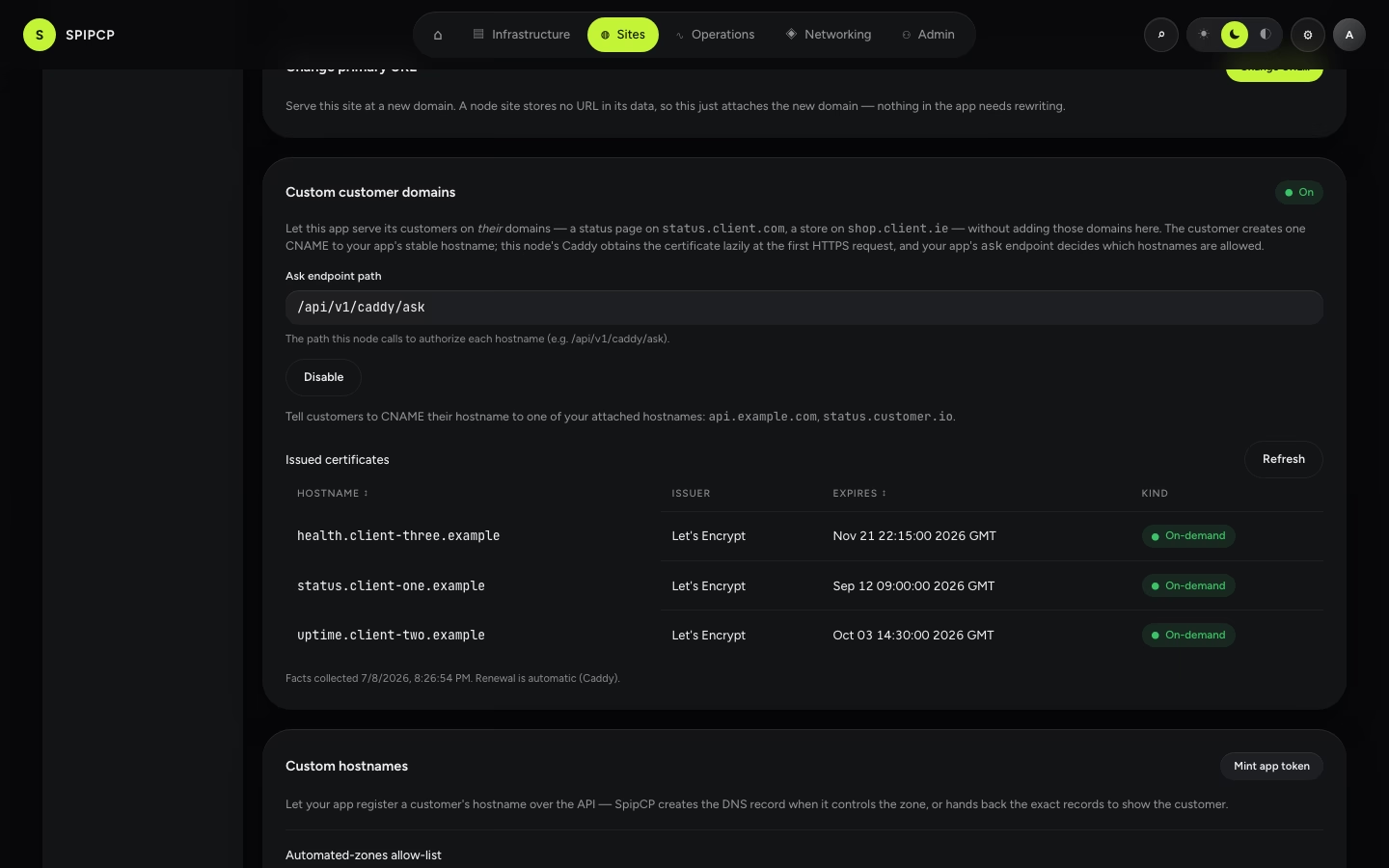
- Site type — only node and docker sites qualify (types that answer HTTP directly). The card indicates when a site type can't use it.
- One per node — a node holds one on-demand app at a time. If another site on the same node already offers custom customer domains, the card says so — a second app belongs on a second node.
- Ask endpoint path — the path this node calls to authorize each hostname (default
/api/v1/caddy/ask). See the ask contract for what the app must implement.
Give customers a CNAME target
Attach the app's own stable hostname the normal way first (the Attach a domain card). The Custom customer domains card then lists the attached hostnames as CNAME targets. Each customer creates one record:
A CNAME:
status.client-one.com→ the app's stable hostname (e.g.app.yourdomain.com).
Apex domains (no subdomain) can't CNAME — the customer uses an A/AAAA record to the node, or an ALIAS where their provider supports it.
Where the customer's CNAME lives — automated, or by hand
The customer-facing step is always one record. Which of three tiers it lands in is detected, not picked — the same Hosted / Connected / External authority the fleet-wide Domains inventory uses:
| Tier | Where the zone lives | Automated? |
|---|---|---|
| Hosted | A self-hosted PowerDNS zone | Yes, once allow-listed (below) |
| Connected | A connected provider account held by the operator | Yes, once allow-listed (below) |
| External | The customer's own DNS (the common case), or a zone neither tier covers | No — exact records are provided to relay |
For a Hosted or Connected zone, the Custom hostnames section below can create the record — via the app's API token or the operator's "Add the record for me" button. For everything else, the customer (or the operator, on their behalf) still creates the record by hand at whoever holds the DNS.
- Cloudflare orange-cloud. It works — the ACME HTTP-01 challenge passes through Cloudflare on port
80, and after the first issuance "Full (strict)" is satisfied by the certificate on the node. Two
caveats: the very first proxied request can return a
525until issuance completes, and grey-cloud (DNS-only) is the smoother, recommended posture. Custom hostnames never proxies a record it creates — ACME HTTP-01 needs a direct path to the origin.
Custom hostnames — automate the DNS step
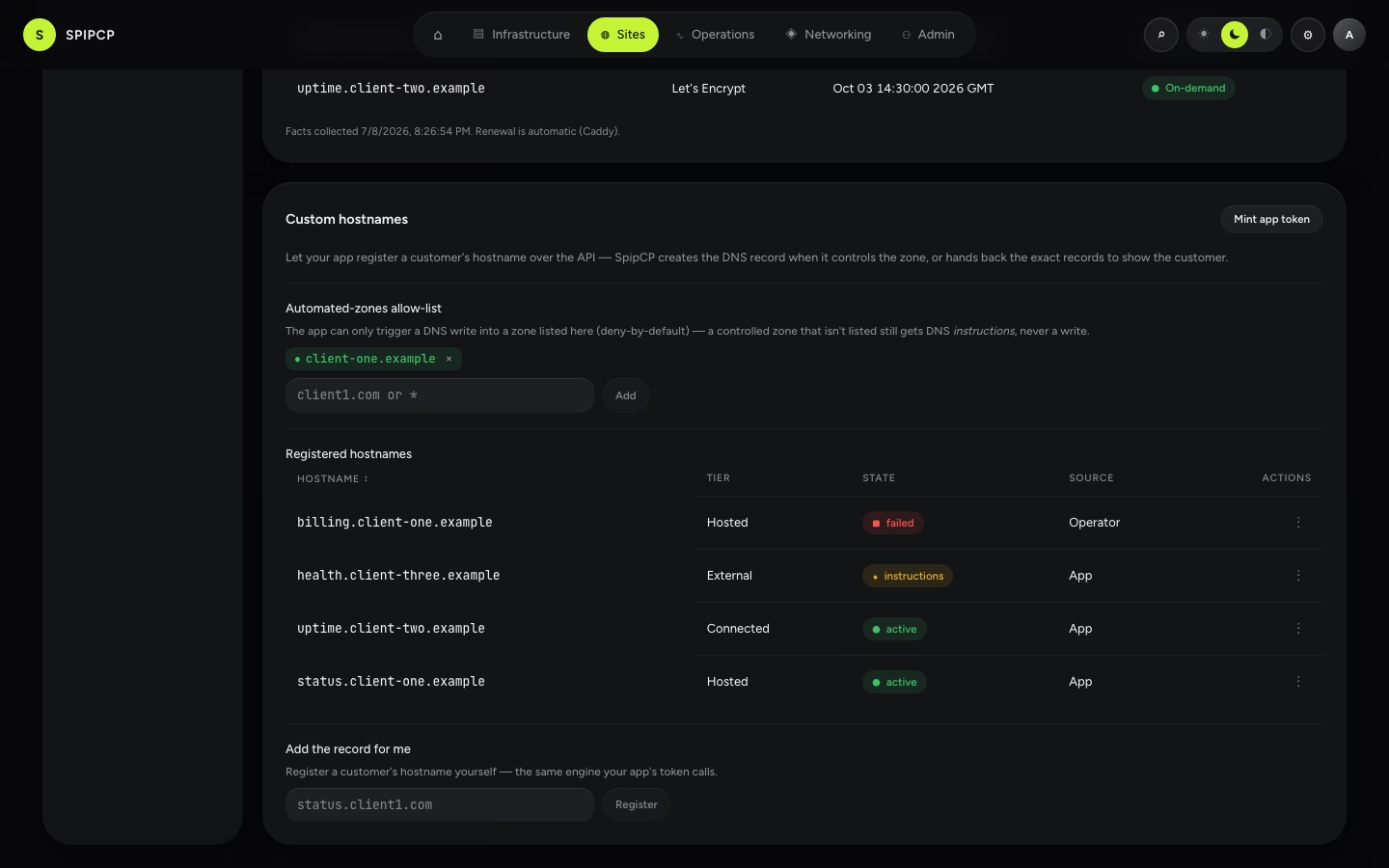
The Custom hostnames section (below the Custom customer domains card) gives the app a machine seam for the DNS step, plus an operator door for doing it by hand. It's deny-by-default: nothing writes into a zone the operator hasn't explicitly allowed.
The automated-zones allow-list
A hostname whose zone SpipCP fully controls (Hosted or Connected) still only gets a written
record if that zone is on this list. Add a zone apex (e.g. client1.com), or "*" for every zone
the installation controls — a loud confirmation warns before "*" takes effect, since it means
the app's token can write into any zone the installation runs, including other customers' zones on
self-hosted nameservers. Most installs list specific zones.
A zone left off the list isn't blocked — a registration against it just comes back as instructions (the exact records to relay), same as an External hostname. Widen the allow-list whenever real demand for it appears in the registered-hostnames table below.
Minting the app token
Mint app token creates a spat_… bearer token bound to this one site, scoped to
custom-hostnames permissions only — it can never reach another site or a fleet-wide surface. Shown
once; paste it into the app's environment. See the Custom hostnames API
for what the app calls with it.
The app's first call is normally a probe: a read-only preview of what registering a hostname would do — automatic, instructions, or blocked — which lets it show the customer the right lane the moment a domain is typed, before asking anyone to prove ownership or write a record. It is a pure read: no row, no job, nothing in the table below.
The registered-hostnames table
Every hostname registered for this site — by the app's token, or by the operator below — with its
tier, state (pending / active / instructions / failed / removing / removal-manual), and
source (App / Operator). The kebab (⋮) menu removes a hostname.
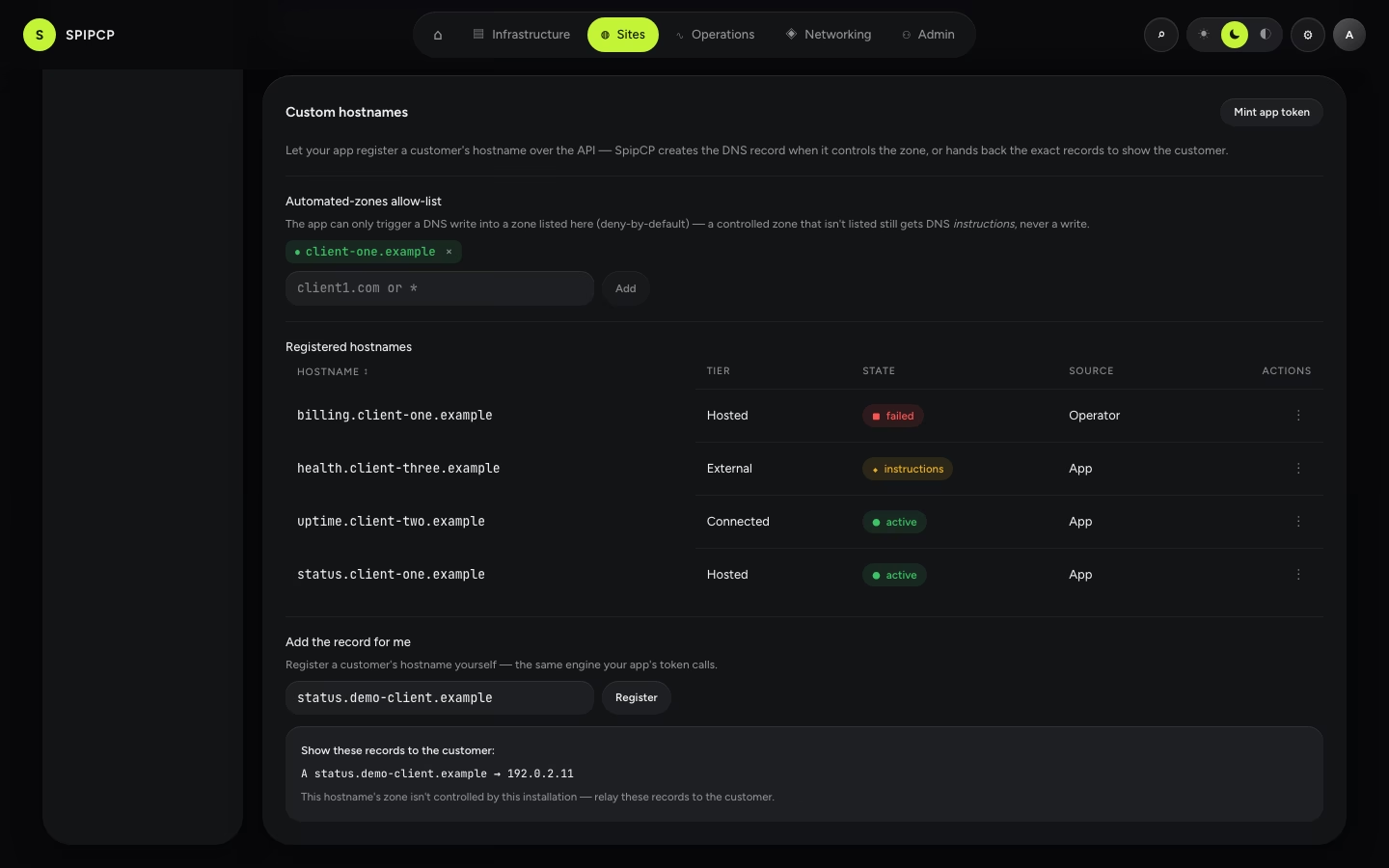
Add the record for me (the operator door)
Register a customer's hostname directly, from the card — the same engine the app's token calls. Type the hostname and click Register: a Hosted/Connected + allow-listed hostname plans a real record and provisions it; anything else renders the exact records to relay to the customer.
Watch issued certificates
Once a customer's domain resolves and someone hits it over HTTPS, Caddy issues the certificate and it appears in the Issued certificates table on the card — hostname, issuer, and expiry.
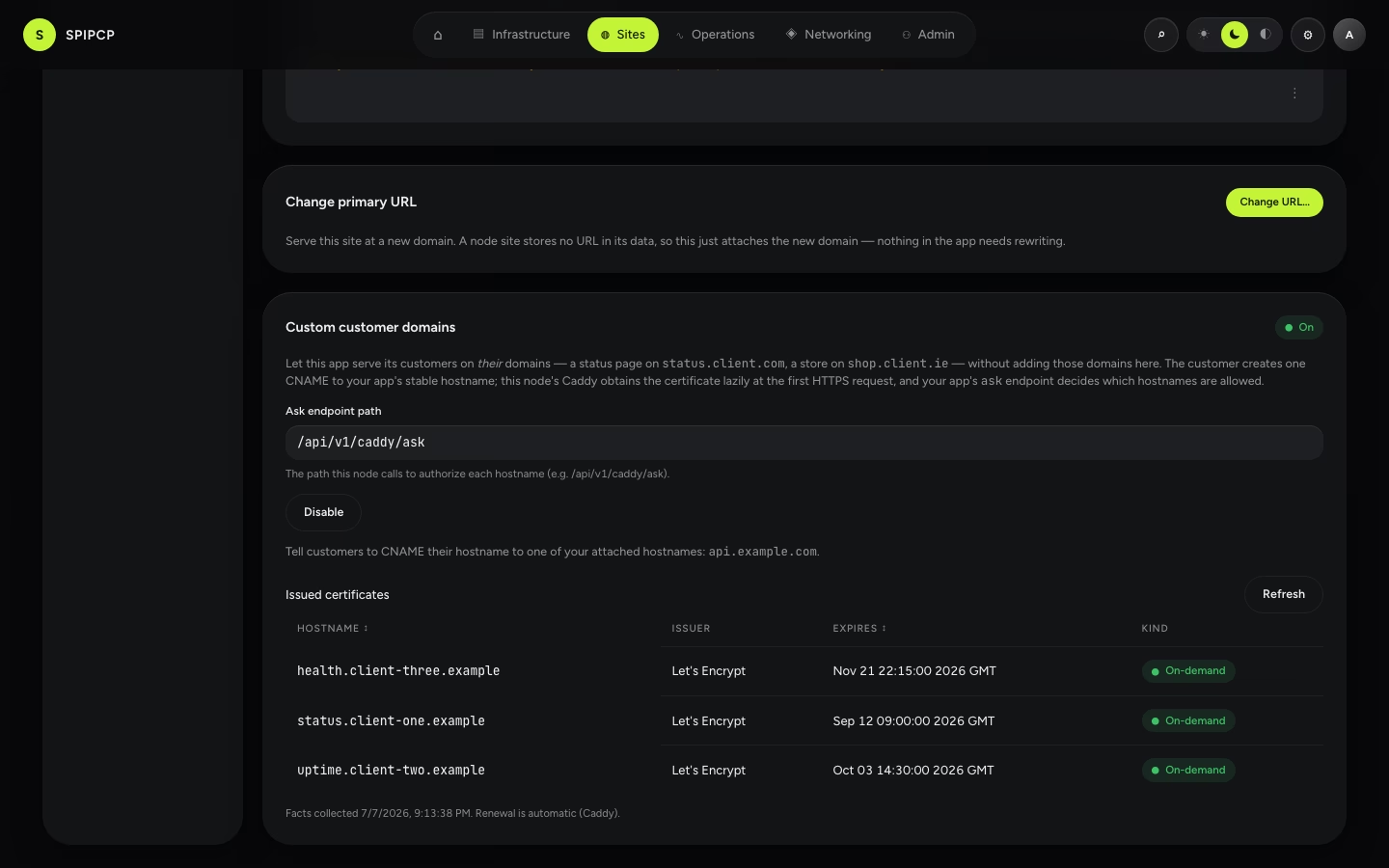
This list is read-only: the panel observes the certificates (it reads them from the node's cert facts) but never provisions or renews per hostname — renewal is automatic, handled by Caddy. Use Refresh to re-read the node's facts. The same roll-up appears fleet-wide on Networking → SSL in the On-demand custom domains section.
Troubleshooting
- The HTTPS handshake fails for a customer. Either the app's ask endpoint denied the hostname (it's not a verified customer domain in the app) or the app is down. The ask endpoint is the only issuance gate — if it says no, no certificate is issued.
- The ask endpoint is down. No new certificates issue while it's unreachable — but certificates already issued keep serving. That's the correct failure direction.
- Disable ≠ revoke. Turning the feature off removes the catch-all so no new hostnames are served, but certificates already in Caddy's store remain (unused) until they expire naturally.
Next steps
- Custom hostnames API — the five calls the app drives with its site-bound token, and the probe → verify → register → poll → prime → poll recipe.
- The ask contract — what the app implements to authorize each certificate issuance.
- Domains: the fleet inventory — the Hosted/Connected/External tiers, and where registered custom hostnames show up fleet-wide.
Domains & SSL
Give a site a real hostname with automatic HTTPS — point one DNS record at it, and SpipCP handles the certificate, renewal, and a check that it actually serves.
Node sites
What a Node site actually is — an app supervised by systemd, on its own port, with an entrypoint, a build command, a package manager and a runtime that are all settings rather than assumptions.