Domains & SSL
Give a site a real hostname with automatic HTTPS — point one DNS record at it, and SpipCP handles the certificate, renewal, and a check that it actually serves.
Attaching a domain gives a site a real hostname with automatic HTTPS. The
site gets a hostname, and one DNS record points at the node. SpipCP routes the traffic, issues the TLS
certificate, and proves https://thedomain actually serves the site before marking it green. A
domain that doesn't pass that check is never shown as working — it's failed with a fix to apply.
Domains attach from the site
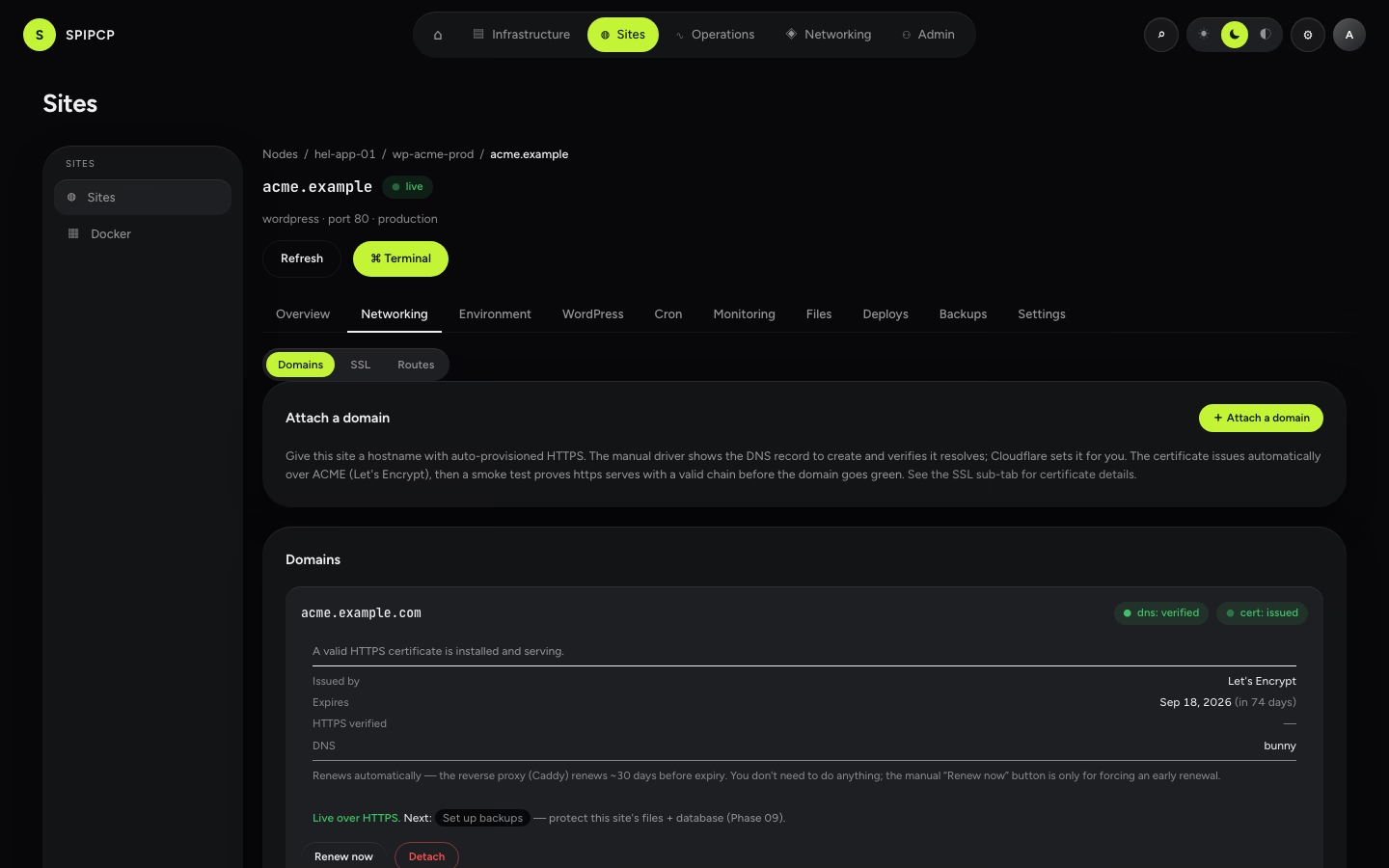
Domains belong to a site, so they're managed under the site workspace's Networking tab — there's no separate top-level Domains page. The Networking tab has three sub-tabs: Domains (attach and manage hostnames), SSL (the certificate dashboard), and Routes (the underlying edge routes).
Domains an app's customers bring
This page is for domains an operator attaches. If an app serves its own customers on their domains
(status.client.com), that's a different feature — see
Custom customer domains, where the certificate is issued on demand
and nobody adds each hostname in the panel.
The one thing DNS needs
SpipCP asks for exactly one DNS record, and never anything else:
An A record:
thedomain→ the node's IP (shown at attach time).
That's the whole DNS setup. Once that record resolves to the node, the attach continues on its own — verify DNS, issue the certificate, test HTTPS, go green. No challenge records, uploads, or an "activate" click are needed.
Cloudflare: DNS only, not Proxied
When DNS is on Cloudflare, create that A record as DNS only (grey cloud), not Proxied (orange cloud) — unless it's attached with the Cloudflare driver (below). This only applies to Cloudflare: the orange-cloud proxy is a Cloudflare feature, so DNS on Bunny, Hetzner, deSEC, Gcore, or self-hosted nameservers has nothing to flip.
The orange cloud hides the server's real IP behind Cloudflare. With the manual driver SpipCP
checks that the hostname resolves to the node's IP, so a proxied record makes the check fail with
dns: failed even though the record exists — SpipCP sees Cloudflare's IPs, not the node. SpipCP
catches this and the remedy says so: "the record is proxied — set it to DNS only." Flip that one
record to grey, then Retry attach.
What the wizard shows before attaching
As soon as a valid hostname is typed, the wizard resolves its authority tier and shows a banner — before the attach commits — stating what will happen:
- Hosted — "zone
example.comis on these nameservers; the DNS record will be created automatically." - Connected — "zone found in a connected provider account (e.g. Bunny); the record will be created automatically." If the cascade's default account doesn't hold this zone, the banner warns of a mismatch and suggests a per-domain override so the attach doesn't fail at record-write time.
- External — "no connected account holds this zone (detected nameserver
dns1.registrar.com); the exact records to create by hand are provided." This sets the expectation up front instead of a surprise at the DNS-verify gate. When the detected nameserver is one SpipCP recognises (e.g. Cloudflare), the banner also offers the fix as a cross-link — "Want automatic records and wildcards? Connect Cloudflare →" — which deep-links into the managed-provider journey with that provider preselected. On an unrecognised nameserver it links the bring-your-own-DNS journey instead.
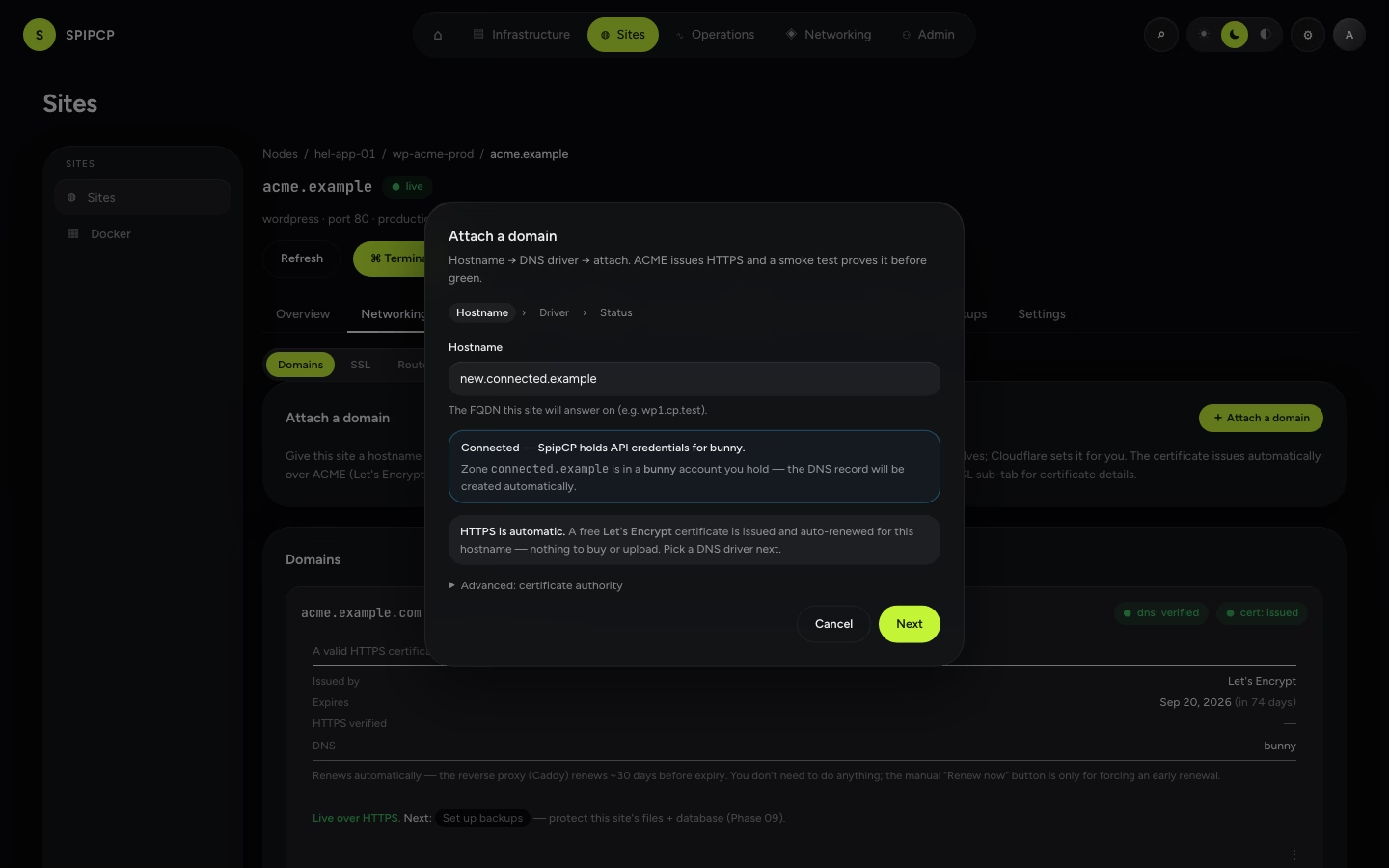
The pre-flight is advisory: the real record write at attach time is always the source of truth. It just turns a late failure into an up-front expectation.
The guided journeys open this same wizard, prefilled
Reaching the attach step from a guided setup journey, the panel picks the site, then opens this wizard with the hostname and the right DNS driver preselected — the manage-records-myself and bring-your-own-DNS journeys preselect the manual driver, the managed-token journey preselects the provider. There is no separate attach form; the journey just drives the one shown here.
Attaching a domain
Enter the hostname. The FQDN the site answers on (e.g. app.example.com). HTTPS is automatic from
here — a free Let's Encrypt certificate, nothing to buy or upload. The wizard shows the detected
authority tier (above) as the hostname is typed.
Pick a DNS driver.
- Manual — SpipCP shows the A record to create; it's added at the DNS provider. (Cloudflare: set it DNS only.)
- A provider driver — Cloudflare, Bunny, Hetzner, deSEC, or Gcore — SpipCP creates the record through that provider's API, using a DNS account set up once. With the Cloudflare driver, the proxy (orange cloud) is safe to leave on, because SpipCP reads the record from Cloudflare's API instead of a public lookup. The other providers have no proxy.
Certificate + check. SpipCP requests the certificate from Let's Encrypt, then tests that the hostname serves the site over a valid HTTPS connection. Only then does it go green.
If a domain fails (wrong record, still proxied, DNS not propagated yet), fix the record and press Retry attach on the domain row — it re-runs the whole flow from the DNS check. No need to detach and start over.
The SSL dashboard
Networking → SSL is a certificate dashboard — one row per domain, showing what's running and when each expires:
| Column | What it shows |
|---|---|
| Domain | The hostname the certificate covers. |
| Issued by | The certificate authority — Let's Encrypt (the default) in production, ZeroSSL / Actalis if selected, an uploaded custom cert, or the local dev CA (Pebble) in development. |
| Certificate | Its state: issued, pending, renewing, failed, or none. |
| Expires | The expiry date and time left (e.g. in 62 days); amber within 21 days. |
| HTTPS | Whether the check confirmed https://thedomain serves with a valid certificate. |
| DNS | Which driver manages the record (manual, or a provider — Cloudflare / Bunny / Hetzner / deSEC / Gcore). |
| Renew now | Force an early renewal (rarely needed — see below). |
A summary strip at the top counts what's secured, what's expiring within 21 days, and what needs attention. The same certificate detail also appears inline on each domain's row in the Domains sub-tab.
Issuance and renewal are both automatic
No certificate needs to be bought, uploaded, or activated manually. When a domain attaches, the node's reverse proxy (Caddy) requests a free certificate from Let's Encrypt and installs it. It then renews each certificate roughly 30 days before expiry — no downtime, no cron job. The Renew now button only forces an early renewal; normal use never needs it. A certificate-expiry check also warns well before one could lapse. The one exception is a custom (bring-your-own) certificate — it doesn't auto-renew; SpipCP still warns on its expiry, and a fresh chain must be re-uploaded before it lapses (see Choosing a certificate issuer).
Automating DNS with provider accounts
To let SpipCP create the record automatically, connect a named DNS account under Settings → DNS providers — a reusable credential set up once and assigned to many domains. SpipCP supports Cloudflare (US), Bunny (EU), Hetzner (German), deSEC (EU, DNSSEC by default), and Gcore (EU). Each account holds the provider's token, scoped to edit DNS records; the token is encrypted, write-only, and never reaches a node. See DNS providers for where to get each token and the EU/GDPR/free-tier notes.
The DNS-account cascade
An account isn't picked per domain by hand every time — a DNS account cascades node → instance → domain, exactly like git accounts:
| Level | Where it's set | Who inherits it |
|---|---|---|
| Node default | A node's DNS tab | every instance + domain under that node |
| Instance default | An instance's DNS tab | every domain on that instance |
| Per-domain override | The attach wizard / the domain row | just that domain |
A level left blank inherits from the one above, and the most-specific value wins: a domain override beats the instance default, which beats the node default. Changing a node's default makes every domain that never overrode follow automatically — no re-attach. Deleting an account something pointed at falls that reference back to "inherit the level above," never a broken pointer.
Set up an account first
Until at least one DNS account is available for a site, that provider's driver is disabled in the attach wizard, labelled "needs token in Settings", with a link to Settings → DNS providers — so no path leads to a failure at attach. Full guide: DNS providers.
Wildcard subdomains and the Caddy DNS module
A wildcard certificate for *.example.com is issued over a DNS-01 challenge — the node's Caddy
proves control of the domain by writing a TXT record through the provider's API. That needs the
matching caddy-dns/<provider> module built into the Caddy on the node serving the site. A single
hostname (no wildcard) uses the simpler HTTP-01 challenge and needs no DNS module.
Requesting a wildcard when the node's Caddy lacks the right module doesn't fail silently —
the wizard names the missing caddy-dns/<provider> module, stating exactly what the node needs
before the wildcard can issue.
Choosing a certificate issuer
Let's Encrypt is the default — free, automatic, nothing to configure. For operators who need an alternative, the issuer is selectable (an advanced choice in the attach wizard) and cascades node → instance → domain just like the DNS account:
| Issuer | What it is | Needs an account? |
|---|---|---|
| Let's Encrypt | The default ACME CA — automatic issue + renew. | No |
| ZeroSSL | An ACME CA requiring EAB (External Account Binding). | Yes — an EAB issuer account |
| Actalis (EU) | An EU ACME CA, also EAB-based. | Yes — an EAB issuer account |
| Custom | Bring-your-own certificate — paste the chain + private key (PEM). | Yes — a custom (PEM) issuer account |
ZeroSSL and Actalis need an EAB issuer account (a Key ID + HMAC key from the provider's dashboard), and Custom needs a PEM account (the certificate chain + private key). Both are added under Settings → SSL issuers, where each secret is encrypted at rest and never reaches a node. Like the DNS account, the issuer account cascades — a default set per node or instance, overridden per domain — and a chosen issuer with no account fails the attach with a remedy rather than going green.
→ Full guide: SSL issuer accounts.
Custom certificates don't auto-renew
A custom certificate isn't issued automatically, so SpipCP can't renew it. It reads the PEM on upload to record the expiry, then warns just like an automatic cert (amber within 21 days, then an alert) — but the fix is to re-upload a fresh chain before it expires (edit the issuer account with the new PEM). Let's Encrypt, ZeroSSL, and Actalis all renew automatically.
What can be managed
| Control | What it does |
|---|---|
| Attach domain | Point a hostname at the site (one A record + the certificate). |
| DNS driver | Manual (the record is set by hand) or a provider (Cloudflare / Bunny / Hetzner / deSEC / Gcore — SpipCP sets it). |
| Issuer (advanced) | The certificate authority — Let's Encrypt by default; ZeroSSL / Actalis or a custom PEM; Pebble for local dev. Cascades node → instance → domain. |
| DNS account | Which named DNS provider account drives the DNS write — inherited from the node/instance default, or overridden per domain. |
| SSL issuer account | Which named issuer account supplies the EAB / custom-cert credential for a non-default issuer — inherited or overridden per domain. |
| Retry attach | Re-run the attach after fixing a failed record (e.g. turning the proxy off). |
| Renew now | Force an early certificate renewal (rarely needed — renewal is automatic). |
| Orange-cloud | Toggle Cloudflare's proxy for a Cloudflare-driver domain (hidden for other providers — it's a Cloudflare product). |
| Wildcard subdomain | Optionally catch *.domain for the site (requires a provider driver + the matching caddy-dns module on the node, since wildcards need a DNS-01 challenge). |
How it works
The node's reverse proxy (Caddy) routes the hostname to the site's port on its instance, issues and auto-renews the certificate, and a certificate-expiry check warns well before one lapses. The test before going green means "green" always means "actually serving."
→ Routes detail: Sites → Networking. · Certificate alerts: Monitoring. · DNS accounts: Settings → DNS providers. · Self-hosted DNS: DNS → Self-hosted. · Issuer accounts: Settings → SSL issuers.
Sites
Launch and run a real website — domains, TLS, a database, files, and git deploys — all from the site workspace.
Custom customer domains
Let a hosted app serve its own customers on their domains — status.client.com, shop.client.ie — with automatic HTTPS, without anyone adding those domains in SpipCP. One toggle, one CNAME per customer, certificates issued on demand.