Rust sites
Point SpipCP at a Rust repo and get a single binary, built with cargo and supervised by systemd on its own port — a compile error fails the build, never a broken running site.
Rust is a first-class site type. A Rust site launches the
same way as any other — pick the type, pick the instance — and SpipCP installs the Rust
toolchain if it isn't there yet, writes a starter app, builds it with cargo build --release, and
runs that binary behind a systemd unit that restarts on failure and survives a reboot.
Rust works the same way as Go: a Rust web app (axum, actix-web, rocket) compiles to
one binary. There is no interpreter to keep alive, no virtualenv, no node_modules — the toolchain
is needed only to build. At run time, systemd executes a binary that depends on nothing but the
system C library.
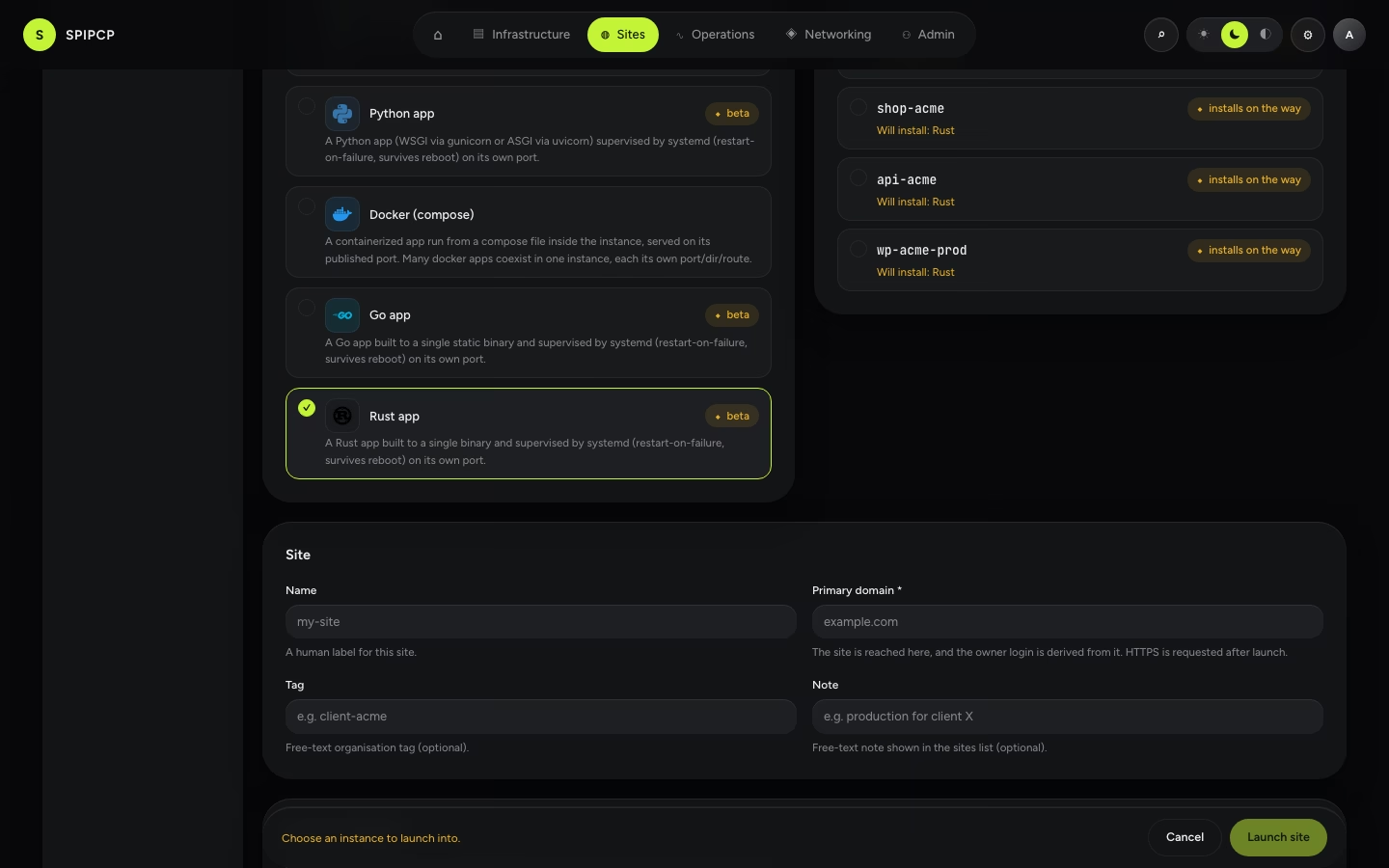
Launch
Pick Rust, pick an instance, and launch. If the instance doesn't already have the Rust toolchain,
SpipCP installs it on the way — via rustup with the minimal profile, plus the
build-essential package (cargo links through the system cc). The starter SpipCP writes is a
zero-dependency std-only HTTP server, so a fresh site is live in seconds — it gets replaced with
real code (or a git deploy). The served port defaults to 8090.
The first real build is the slow one
The std-only starter builds in seconds. The first real deploy — a repo with an axum/actix crate
graph — compiles hundreds of crates and takes minutes on a small instance. That is Rust, not
SpipCP: every build after the first is fast, because the build cache persists across deploys (see
Build vs run). When a repo pins a toolchain with a
rust-toolchain.toml, it's respected — rustup fetches that toolchain on the first build, so expect
that one to be slower too.
The app lives in /srv/app/<site>
SpipCP builds each release and installs the artifact to /srv/app/<site>/current/.bin/app, then runs
that — current is the symlink a deploy moves, so the unit executes whichever release is live. The
cargo build cache and registry live in /srv/app/<site>/shared/cache, outside any one release,
so they persist across deploys — but they are
excluded from backups (reproducible build output is not state; see Disk &
backups). Like a Node site runs npm install only when a package.json is present,
the build runs cargo init only when the repo has no Cargo.toml yet.
Build vs run — the one concept
A compiled type has a hard boundary that interpreted types don't. SpipCP builds the repo to a binary, then runs only that binary:
- On launch, the build runs before the service starts. A compile error fails the launch at the build step, with the error to fix — the site never goes live with a missing binary.
- On restart or reboot, systemd re-executes the already-built binary. No rebuild, no toolchain needed at run time — which is why the run path is the most robust of any site type.
The build cache (CARGO_TARGET_DIR) lives outside the release directories and persists across
deploys, so deploy N+1 recompiles only the crates that changed — the difference between minutes and
seconds. This makes a Rust site's deploy story arguably safer than an interpreted one: a broken
commit is caught at build time, before it can ever serve.
Deploy with git
Connect a git source and git push deploys: SpipCP fetches the commit, rebuilds the
binary with cargo build --release, smoke-checks it, and cuts over atomically. A commit that
doesn't compile aborts before cutover — the build fails, the symlink never flips, and the site keeps
serving the previous binary. A broken push can't take the site down.
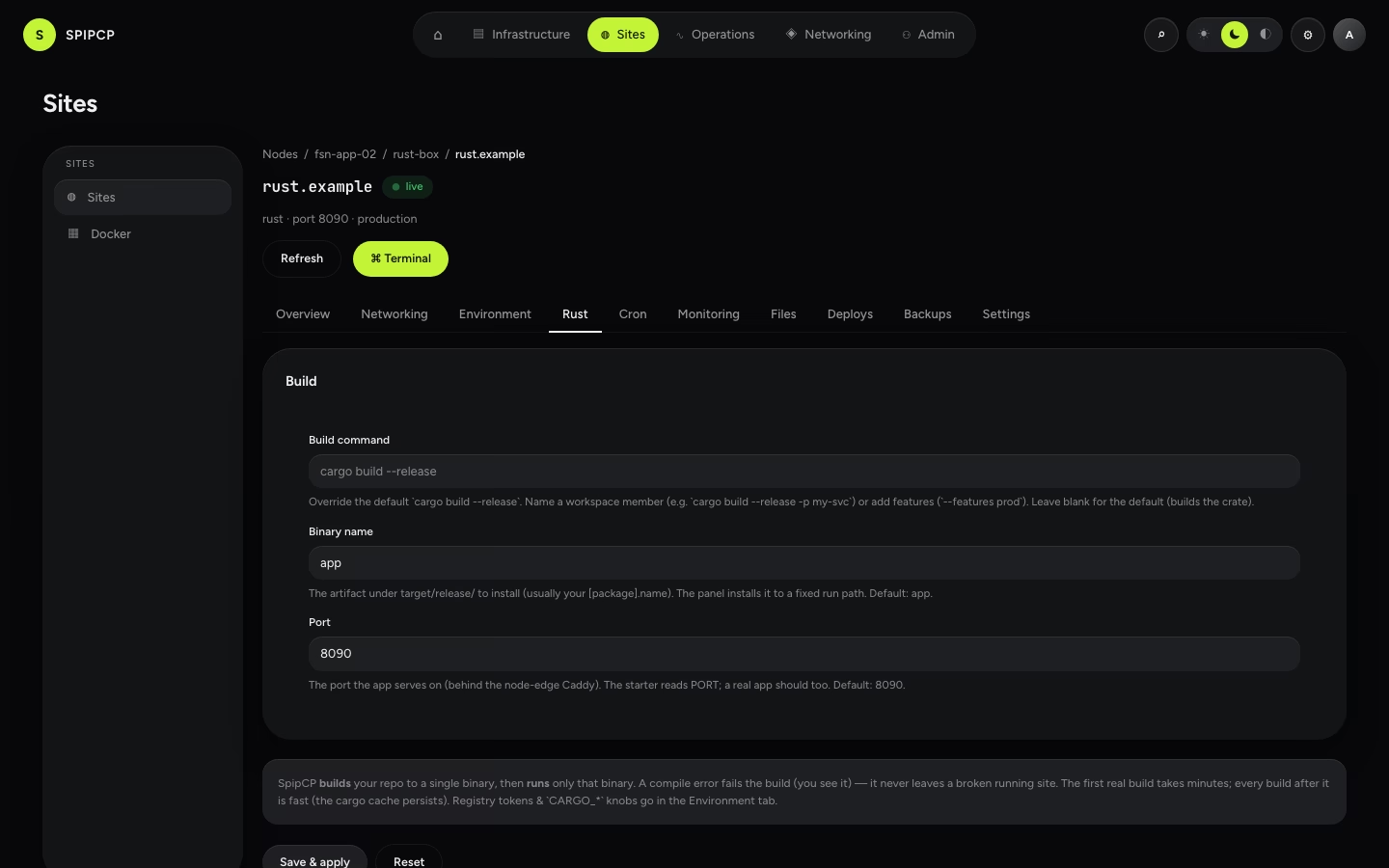
Configure the build
The Rust tab on a site (shown only for Rust sites) exposes three build knobs:
| Setting | What it does |
|---|---|
| Build command | Override the default cargo build --release. Name a workspace member (e.g. cargo build --release -p my-svc) or add features (--features prod). Build only — SpipCP installs the result at .bin/app itself, so the command must not copy it. Set binary name to whatever the build produces. The default builds the crate at the repo root. |
| Binary name | The binary the build produces under target/release/ — SpipCP installs it to the fixed run path .bin/app. Change it to match a custom build command. Default: app. |
| Port | The port the app serves on, behind the node edge. The starter reads PORT; a real app should too. Default: 8090. |
Save & apply persists the change and relaunches the site so the new build actually lands inside the instance — the same process the first launch ran, never a faked in-place edit. The status goes to launching; watch the Deploys tab for the result.
Private registries & env
Cargo registry settings ride the environment editor, not the build knobs
above, because they are environment: RUST_LOG, CARGO_* knobs, and — for a private registry — a
CARGO_REGISTRIES_*_TOKEN. The token is stored as a secret (encrypted, revealed once with an audit
trail). This is explicit and operator-added, not auto-magic: the needed variables are added and the
build picks them up from the app's env file.
Sharing an instance
Runtimes coexist freely — an instance can hold the Rust toolchain and Go and Node and PHP and a database side by side, and a Rust API can share an instance with a WordPress/PHP/static site (disjoint paths + ports, per-hostname routing) — e.g. a Rust API next to the WordPress it serves. Every app-on-a-port type has a distinct default port (Node 3000 · Python 8000 · Go 8080 · Rust 8090), so nothing collides out of the box.
That limit is gone: because the site directory is /srv/app/<site>, a Rust site sits beside another
Rust, Go, Node or Python site in the same instance. Only the default ports need attention — two Rust
sites on one box means giving the second a port of its own.
Disk & backups
A Rust toolchain is ~1.4 GB (the minimal profile), and a per-app build cache can reach gigabytes — size the instance accordingly (the default instance has headroom for a normal crate graph). Both are stated plainly rather than hidden:
- Backups capture the site directory at
/srv/app/<site>(every release, the shared tree, and anydata/dir) but exclude the build caches — a multi-GBtarget/of reproducible.rlibfiles is not state. See Backups. - Logs stream from the unit's
journalctlin the site's Monitoring → Logs view — setRUST_LOGin the env editor to control verbosity. See Logs.
Why not just Docker?
A Rust binary can already run in a Docker site, but that means hand-authoring the image and compose file. The Rust type is the paved road — point at a repo and get a built, supervised binary with git-deploy, an env editor, backups, and a domain. Docker stays the escape hatch for a pre-built image or a multi-service app.
→ The full menu: What can be installed. · How a type is defined: Blueprints.
Go sites
Point SpipCP at a Go repo and get a single static binary, built and supervised by systemd on its own port — a compile error fails the build, never a broken running site.
WordPress settings
Tune a WordPress site without touching a config file — the fronting web server (nginx or OpenLiteSpeed), PHP limits, OPcache, and page / object caching, applied with one click.