Domains: the fleet inventory & the three tiers
One table for every hostname the fleet serves, each tagged with its detected DNS authority — Hosted, Connected, or External. The tier is detected, never picked.
Networking ▸ Domains is the home of the section: one row for every hostname the fleet serves, fleet-wide — unlike the per-site Domains tab, which shows only one site's hostnames. Each row is tagged with the authority tier SpipCP detected for it, answering the one question that matters operationally: who controls this domain's DNS, and can SpipCP write records for it?
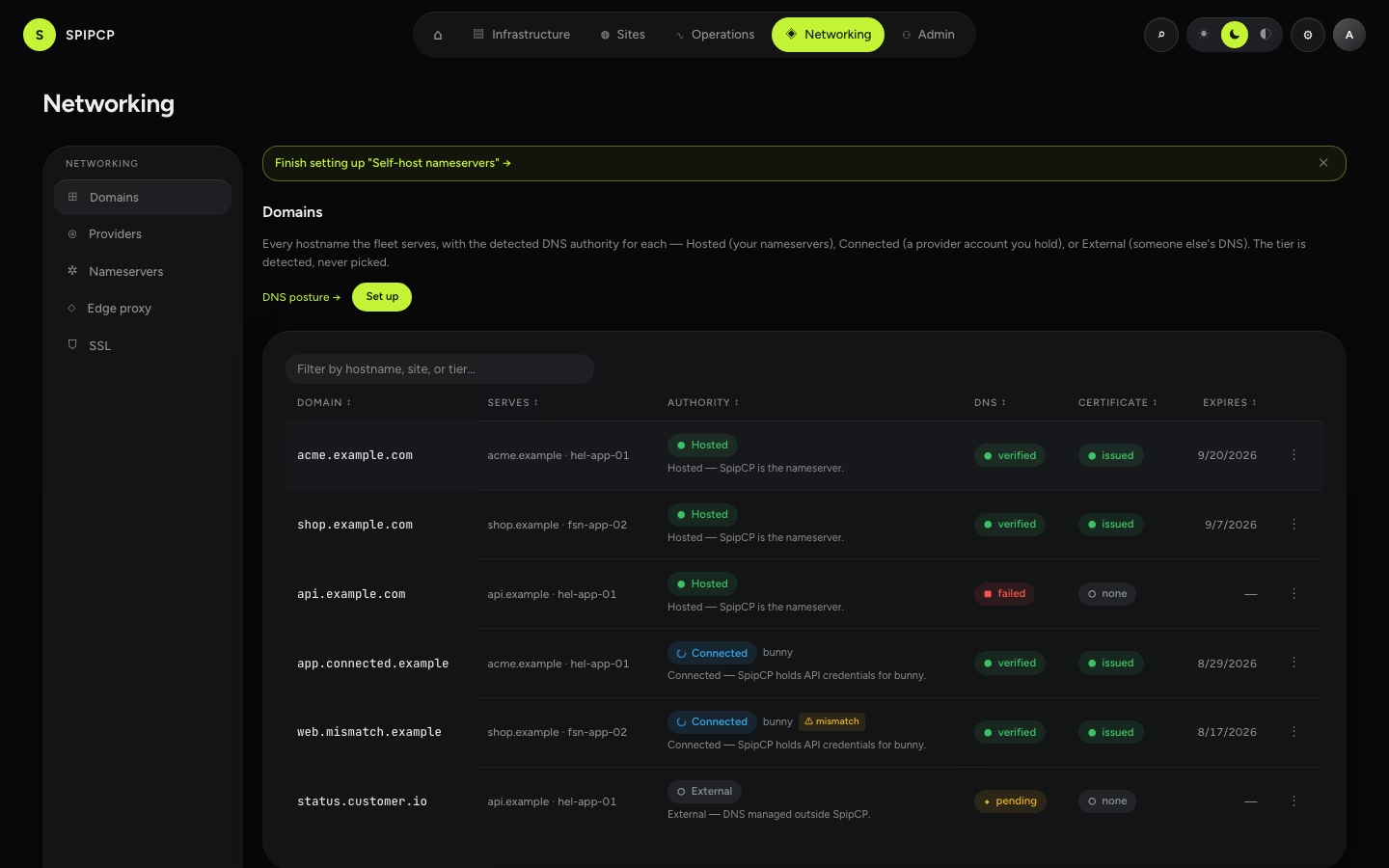
Each row shows the hostname, which site and node serve it, the authority tier (a badge), the DNS state, the cert state, and the expiry. Filter or search by hostname, site, or tier; the kebab (⋮) menu opens the owning site's Domains tab or renews the certificate.
The three tiers (the demarcation)
For any hostname the operationally meaningful question is: can SpipCP write DNS records for it? The answer is one of three detected tiers.
| Tier | Meaning | Records auto-created? | Who pays for DNS |
|---|---|---|---|
| Hosted | The panel is the nameserver — the zone is on PowerDNS boxes it operates. | Yes, on those boxes (DNSSEC available). | No one — it's self-run. |
| Connected | The zone lives elsewhere, but an API credential is held for it. | Yes, via the provider's API. | The DNS provider. |
| External | No control — the customer's or registrar's DNS. | No — exact records to create by hand are shown. | Whoever holds that DNS. |
The tier is detected, never picked
Nothing declares "this is external." The zone-authority resolver derives the tier from what it can see: a matching zone on the panel's nameservers (Hosted), a matching zone in a connected provider account's cached zone list (Connected), or neither (External). It reads only local data — it never queries a provider per request.
Each tier badge also carries a plain-language subtitle that spells out the detected nameserver, so the frozen vocabulary reads in human terms at a glance:
- Hosted — "zone on panel nameservers (
ns1.spipdns.com); records managed by SpipCP." → go to Nameservers. - Connected — "zone in the connected Bunny account; records managed by SpipCP." → go to Providers.
- External — "NS at cloudflare.com (detected); records managed there." → see External domains.
External domains, honestly
For an External hostname SpipCP never pretends to manage the zone. The row shows the detected nameserver (a best-effort, display-only lookup of who currently answers for the domain), the exact records to create, and a re-verify action. Create the record at whoever holds the DNS, then re-verify — the cert issues over HTTP-01 once it resolves.
Mismatch warnings
Sometimes the account the cascade would use isn't the account that actually holds the zone. When that happens the row shows a ⚠ mismatch badge. It means: the default DNS account for this domain doesn't cover this zone, so an automatic record write would fail. The fix is either a per-domain override (point this one hostname at the account that holds the zone) or moving the zone into the account the cascade already uses. The attach wizard catches this up front (see the attach pre-flight).
An ambiguous note appears instead when more than one connected account holds the same zone — the oldest account is used; a per-domain override fixes it when a different one is wanted.
Customer-managed (on-demand)
When apps serve their end-customers' own domains (Custom customer domains),
those hostnames never get an ordinary site_domains row — they appear in their own
Customer-managed (on-demand) section at the bottom of the inventory, each linking to the owning
site. A row is one of two kinds:
- Registered — created through the Custom hostnames API
or the site card's "Add the record for me" — shows its detected tier (Hosted/Connected/
External), state (
pending/active/instructions/failed/…), and source (App/Operator). - Observed — a certificate the panel sees Caddy has issued, with no registered row behind it (the customer's DNS was set up entirely outside SpipCP). Read-only — the panel only observes it.
A hostname that's both registered and observed shows once, as the registered row (it already carries everything the observed row would).
The section is present even when it is empty, because that is where the capability is discovered: with nothing registered yet it names what the lane is for and offers Set up app customer domains, which starts the guided journey. Once rows exist it lists them, with a quiet Set up another app link in the header. The two entry points, one line each:
- An app should serve customer domains → Networking → Domains → Set up app customer domains.
- This one site needs wiring → Sites → site → Domains → Custom hostnames — where every control lives. The journey never duplicates a form; it says which control is next and opens it.
First run & the Set up surface
Before anything is attached, Domains is the posture chooser: the three-posture mental model (managed provider / self-hosted nameservers / manual), the demarcation matrix, and a first-run nudge to pick how DNS is served. Once the first hostname is attached, the page becomes the inventory above and the posture chooser collapses to a compact DNS posture → link in the header.
The header also carries a Set up button — always present, not just on an empty install. It opens the guided setup journeys: pick a posture and follow a resumable checklist whose progress is read from the live fleet. While a journey is mid-flight, the inventory shows one slim nudge banner linking back to it — naming the journey when there is one, counting them when there are several — so a half-done setup is never lost: work can resume with the registrar and pick up exactly where it left off.
DNS in SpipCP: the two layers
The one model that prevents most DNS confusion — delegation (the nameservers, set at the registrar) versus the records (A/CNAME/TXT, inside whoever is authoritative) — then a posture to pick.
Managed DNS providers
Use a managed DNS provider — Cloudflare, Bunny, Hetzner, deSEC, or Gcore — to hold records without running servers. Pick one, add a credential, select it via the cascade, attach a domain.