Managed DNS providers
Use a managed DNS provider — Cloudflare, Bunny, Hetzner, deSEC, or Gcore — to hold records without running servers. Pick one, add a credential, select it via the cascade, attach a domain.
A managed provider holds DNS records on the operator's behalf. Delegation to its nameservers already happened (that's Layer 1, done when the domain was set up there), so SpipCP only touches Layer 2: it writes the A/AAAA/CNAME/MX/TXT records (and the wildcard) through the provider's API. This is the least-effort path — no nameserver boxes to run.
Provider accounts live under Networking → Providers
The managed-provider account list is Networking → Providers. The self-hosted zone + record editor now lives only under Nameservers (one home each). The old Settings → DNS providers link still redirects here, so nothing is broken.
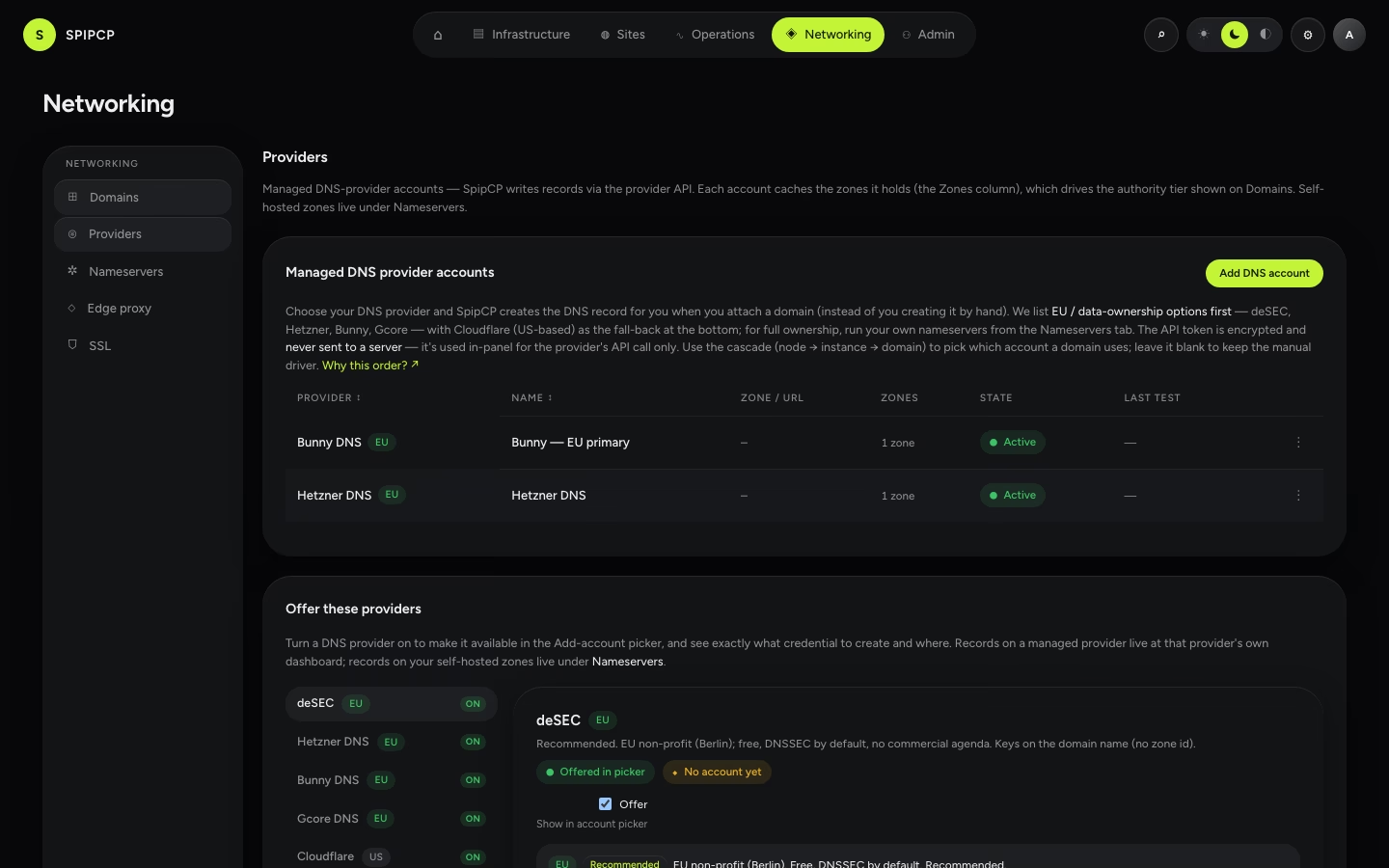
The Zones column (the zone-list cache)
Each managed account row shows a Zones count: how many zones that account is authoritative for. SpipCP caches this list per account so the zone-authority resolver can tell, without a live API call on every page, whether an attached hostname is Connected (its zone is in one of the accounts) or External (it isn't). The cache refreshes on create or update of an account, on Test, on Refresh zones from the account's ⋮ menu, and on a daily sweep. If a refresh fails, the previously cached list is kept and a ⚠ marks the row — staleness is advisory: the actual record write at attach time is always the source of truth. PowerDNS (self-hosted) accounts show self-hosted here — their zones are already known from the nameserver boxes.
Moving off US-hosted DNS
For GDPR or data ownership — getting records off US-hosted infrastructure — managed EU options exist that cost nothing:
| Provider | Hosted | Cost | Why pick it |
|---|---|---|---|
| Cloudflare | US | Free | The default many people already have. The only one with the orange-cloud proxy. |
| Bunny | EU (Slovenia) | Free | Simple, fast EU DNS. |
| Hetzner | Germany | Free | German DNS; natural fit when servers are already at Hetzner. |
| deSEC | EU (non-profit) | Free | German non-profit; DNSSEC on by default on every zone. |
| Gcore | EU (Luxembourg) | Free tier | Anycast network with a usable free tier. |
Picking any of Bunny, Hetzner, deSEC, or Gcore moves records to EU-hosted DNS while staying fully managed. Owning the nameservers too (Layer 1) means moving to self-hosted DNS — more control, more responsibility.
Pick one, add a credential
Four steps. The first three are a one-time setup; the last happens per domain.
Choose a provider from the table above, based on where the records should be hosted.
Add the credential under Networking → Providers → Add account — name it, pick the provider, paste the provider's API token (and a Zone where the provider needs one). The connect dialog shows that provider's demarcation inline (wildcard automatic? proxy available?), so the trade-off is visible before saving. SpipCP tests the token on connect. It is encrypted, write-only, and never reaches a node. Where to get each provider's token is in the DNS providers setup guide.
Select it at the right level (the cascade — below).
Attach a domain to a site with that provider — SpipCP creates the record automatically. Full flow: Domains & SSL.
Select it via the cascade
An account is rarely picked per domain by hand. A DNS account cascades node → instance → domain, exactly like git accounts:
| Level | Where it's set | Who inherits it |
|---|---|---|
| Node | A node's DNS tab | every instance + domain under that node |
| Instance | An instance's DNS tab | every domain on that instance |
| Domain | The attach wizard / the domain row | just that domain (the override) |
A level left blank inherits from the one above. The most-specific set value wins: a domain override beats the instance default, which beats the node default. Change a node's default and every domain that never overrode follows automatically — no re-attach. Delete an account something pointed at and that reference falls back to "inherit the level above," never a broken pointer.
Mixed providers for compliance
Because the account resolves per domain, one node — even one instance — can serve domains on different providers at once. This is the headline compliance lever: keep the convenient default for most domains, and pin the regulated ones to an EU provider, without moving anything.
Example — Cloudflare by default, deSEC for the GDPR-sensitive site
Say a node hosts several sites. The node default is set to a Cloudflare account (fast, familiar) — so every domain inherits Cloudflare. Then, for the one client whose data must stay in the EU, that domain gets its override set to a deSEC (EU, non-profit) account. Result:
shop.example.com,blog.example.com→ Cloudflare (inherited from the node)patients.clinic.eu→ deSEC (the per-domain override)
All on the same node, same instance. Switching the regulated domain's provider later re-attaches only that domain — the rest never move. It works the other way too (EU default, one domain on Cloudflare), or per-instance (a whole tenant on one provider) — whatever the compliance boundary is.
There is no "one node = one DNS" restriction. The only single-purpose kind is a self-hosted nameserver box, which runs DNS and nothing else by design.
Attach a domain
Once an account resolves for the site, the provider shows up in the attach wizard. SpipCP picks the effective account (override → instance → node), writes the record automatically, then runs the usual DNS verify → certificate → smoke test before going green. If no account resolves, that provider is disabled in the wizard with a link to Settings, so no path is started that fails at attach.
The orange-cloud proxy is Cloudflare-only
The proxy toggle (Cloudflare's orange cloud) shows only for Cloudflare domains — it's a Cloudflare product (its edge that fronts the origin IP), not a DNS feature, so Bunny / Hetzner / deSEC / Gcore don't have it. With Cloudflare, SpipCP reads the record back from the API, so the proxy can stay on without failing the attach check.
Wildcards need a Caddy DNS module on the node
A *.example.com certificate needs the node's Caddy to write a TXT record through the provider's API
(the ACME DNS-01 challenge), which requires the
matching caddy-dns/<provider> module compiled into the Caddy on that node. If it's missing, the
wizard names exactly which module to add rather than failing silently. A single hostname (no
wildcard) needs no module. Self-hosted nameservers can now do wildcards too, via the
caddy-dns/powerdns module — see SSL/TLS certificates.
Next steps
- Settings → DNS providers — per-provider token instructions + the full reference.
- Run dedicated nameservers — the self-hosted alternative.
- SSL/TLS certificates — the full cert matrix and the fleet dashboard.
- Domains & SSL — the attach flow and the SSL dashboard.
Domains: the fleet inventory & the three tiers
One table for every hostname the fleet serves, each tagged with its detected DNS authority — Hosted, Connected, or External. The tier is detected, never picked.
The External tier & CDN caveats (Cloudflare, Bunny, …)
What "External" means as a detected authority tier, how to create the records SpipCP asks for by hand, and the per-provider caveats (Cloudflare orange-cloud, etc.).