Run dedicated nameservers
Own DNS end to end by running PowerDNS on cheap VPS as nameserver nodes. The trade-offs (two boxes, the upkeep, no anycast), how it works, and why it's worth it for data ownership.
Self-hosted DNS means the operator's infrastructure is authoritative for its domains — the
nameservers run there, the records live there, no third party sits in between. Where a
managed provider only handles Layer 2 (the records, because
delegation to it already happened), self-hosted DNS owns both layers: the domains point at
dedicated ns1/ns2.spipdns.com, and SpipCP writes the records onto those boxes.
Why
- Data ownership. Records — who points where, mail (MX/SPF/DKIM/DMARC), subdomains — live on infrastructure under direct control, not a provider's account that could be suspended, priced up, or subpoenaed.
- Off third-party (and US) soil entirely. Even the EU managed providers are still someone else's service. Self-hosting puts the whole stack under direct control.
- No per-zone limits or lock-in. The DNS belongs to the operator; add as many zones and records as the boxes hold.
The trade-offs
Running dedicated nameservers is real infrastructure, not a toggle:
This is upkeep taken on, not a toggle
- Two boxes are required, not optional. A single nameserver is a single point of failure for
every domain delegated to it. The whole point of
ns1+ns2is that the second box is the backup — so they must be two separate VPS in different locations. Puttingns1andns2on one box buys nothing. - The upkeep falls to the operator. Patching, uptime, and the registrar steps (glue + per-domain delegation) are work the panel guides but cannot do automatically.
- No anycast. The two VPS sit in two locations; a big managed provider answers from dozens of points worldwide. For most sites two well-placed boxes are plenty, but the lowest possible lookup latency or massive DDoS-absorbing DNS still favors a managed provider. Self-hosted is chosen for ownership, not for anycast.
When the upkeep isn't worth it, an EU managed provider gets records off US-hosted DNS with none of this.
How it works
SpipCP runs PowerDNS on each nameserver box and writes to each box one at a time. The boxes share no database and no zone transfer between them; the panel pushes every zone and record change to each box on its own.
The panel drives each box's PowerDNS through the node's own agent — the same authenticated agent WebSocket that carries everything else — rather than reaching over a direct HTTP connection to the box. That keeps the PowerDNS API bound to localhost on each box and never exposed to the network: nothing listens publicly except port 53. It also means a box behind a strict firewall or NAT no longer shows as "unreachable" just because its API port can't be dialed from the outside — if the agent is connected, the panel can drive PowerDNS.
That buys two things:
- One box down doesn't block edits. Because the panel writes to each box separately, a box being unreachable doesn't stop DNS edits — the reachable box still takes the write, and the down one catches up when it returns.
- Automatic failover. Both boxes are listed as nameservers for the domain, so resolvers try each one
— if
ns1is unreachable, the world falls back tons2with nothing to configure. See Failover.
                  ┌─────────────────────────┐
                  │  A record is edited     │
                  │  in the panel           │
                  └────────────┬────────────┘
                               │  push to EACH box (via its agent →
                               │  localhost PowerDNS API)
                ┌──────────────┴──────────────┐
                ▼                              ▼
       ┌─────────────────┐            ┌─────────────────┐
       │  PowerDNS @ ns1 │            │  PowerDNS @ ns2 │
       │  location A     │            │  location B     │
       └────────┬────────┘            └────────┬────────┘
                ▲                              ▲
                └──────────────┬──────────────┘
                               │  resolvers try either,
                               │  fall back automatically
                  ┌────────────┴────────────┐
                  │  the world's DNS        │
                  │  resolvers              │
                  └─────────────────────────┘

  No shared DB · no AXFR — each box is written independently, so one box
  down never blocks a write, and failover is automatic.
A nameserver node is its own kind of node: SpipCP won't host instances or sites on it. It runs
DNS and nothing else, added through its own Add-a-nameserver flow
under Networking → Nameservers (the Nameserver boxes tab) — not the generic add-node path. (The
old DNS → DNS Servers link still works.) Each nameserver row links across to its underlying Node, and a role=nameserver node links
back here. DNSSEC is supported (PowerDNS signs the zone and holds the keys; the panel reads the DS for
entry at the registrar — see DNSSEC).
Wildcard certificates
Self-hosted nameservers are wildcard-cert-capable. A *.example.com certificate needs the ACME
DNS-01 challenge — and because SpipCP owns the
PowerDNS API on these boxes, the node's Caddy self-solves it via the compiled caddy-dns/powerdns
module, writing and tearing down the _acme-challenge TXT automatically. The result issues and
auto-renews exactly like a per-host cert, so the self-hosted posture is fully automatable — no
third-party DNS credential required. See SSL/TLS certificates for the full
matrix.
How to get there
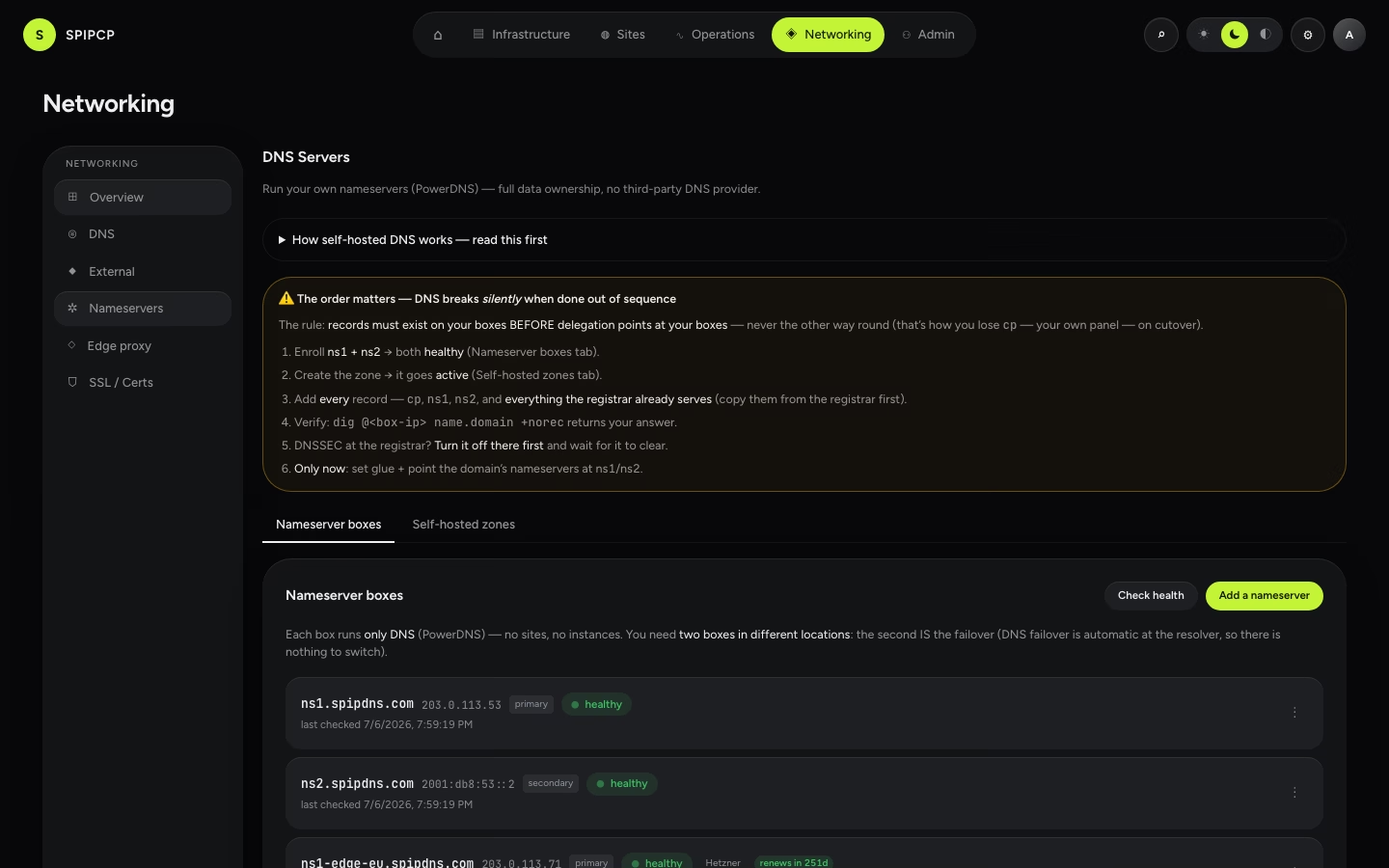
Everything lives under Networking → Nameservers in the panel — a page titled DNS Servers with two tabs, Nameserver boxes and Self-hosted zones. (The old DNS → DNS Servers link still works.)
Or follow the guided checklist
The Self-host nameservers journey on the Set up surface sequences this whole page's steps into one resumable checklist — box → box → glue → zone → records → DNSSEC-off → delegate → attach — and adds a Check now button to the two steps done at the registrar: it resolves the glue records and delegation from outside and reports whether they're visible yet. The check is advisory, never a gate — a red result means "not yet propagated," not "misconfigured."
Records first, then delegate — never the other way round
The single rule that governs go-live: records must exist on the boxes BEFORE delegation points at
those boxes. Delegating first means that, hours later, the panel itself at cp.example.com can go
dark because the cp record was never added to the boxes. The DNS Servers page keeps this order in
front of the operator as an always-visible callout above the tabs; the full six-step sequence is on
Delegate a domain.
- Setup — buy a nameserver domain, enroll two VPS as nameserver nodes, install PowerDNS, run the one-time glue wizard.
- Delegate a domain — create the zone, add records, point the registrar at the new nameservers, verify it propagated.
- Failover — what two nameservers buy and what the panel monitors.
- DNSSEC — sign the zones and register the DS.
SSL/TLS certificates
The full SpipCP certificate matrix — per-host and wildcard, managed and self-hosted, custom (self-supplied) PEM — the fleet cert dashboard, and the passthrough guarantee that TLS terminates on the serving node.
Set up nameservers
Step by step — buy a nameserver domain, enroll two cheap VPS in different locations as nameserver nodes, let SpipCP install PowerDNS, then run the one-time glue wizard at the registrar and verify it.