Removing a node
One action, one choice — stop managing a server and take the agent off it, over the agent's own connection rather than SSH, with the node's token revoked before anything else is attempted.
Remove node is on the node's own page. It takes one decision:
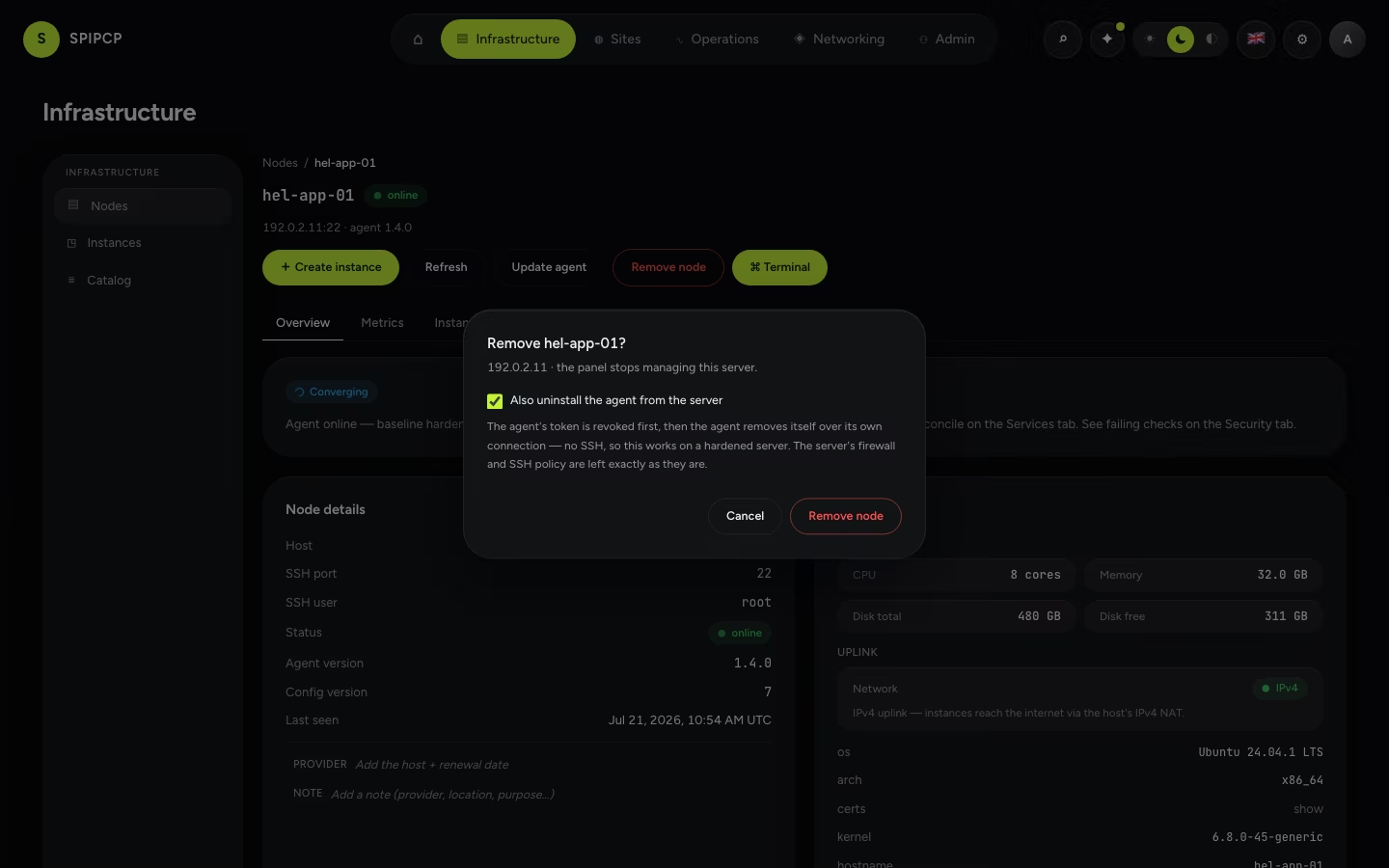
Also uninstall the agent from the server
Checked — the default when the server is reachable — the agent is stopped, disabled, and removed along with its unit file, binary, configuration, runtime state, and service user. The server is left clean and can be added again from scratch.
Unchecked, the agent keeps running. Its token is revoked, so it can manage nothing, but it will keep dialling home and will appear under Unrecognised nodes calling home. That is occasionally what is wanted — a server being handed to someone else who will keep managing it — and the dialog says so rather than leaving it to be discovered.
What happens, in order
The order is the design, not an implementation detail:
- The token is revoked. From this moment the agent cannot authenticate, so an agent that survives everything below cannot come back as a stranger asking to be adopted.
- The agent is uninstalled over its own connection. Not SSH — the panel's own hardening closes root and password SSH, and the intrusion blocker bans a retry loop, so the SSH path failed precisely on the servers most worth decommissioning. The agent is already holding a connection; the instruction goes down that. SSH remains as a fallback for an agent that is already gone.
- The record is deleted — and only then.
A cleanup that cannot finish therefore leaves a silent server, never one asking to be adopted again.
When the server is unreachable
The node keeps a record in awaiting cleanup. Its token is already revoked, so it cannot come back as a healthy node, and the panel has not forgotten that it owes this box a cleanup.
There are two ways out:
- The server comes back. Its connection is refused, and it is handed a signed instruction to remove its own agent — signed with the secret it already holds, so the most destructive instruction in the protocol cannot come from anywhere else. It uninstalls itself and stops.
- The server is gone for good — wiped, cancelled, or returned to the provider. The server is gone — forget it clears the record.
A refused connection is never the end of an agent
From the agent's side, "the token was revoked" and "the panel lost its database" are the same event. The second is a recovery that depends on the agent continuing to dial home so it can be claimed back — see Re-adopt workloads. So a refusal alone changes nothing about an agent's behaviour. Only an explicit, signed decommission stops one, and it stops it by uninstalling rather than by giving up.
What is left behind
The uninstall reverses what the enrollment installed, and nothing more. The OS-level hardening the agent applied — the firewall, the SSH policy, the intrusion blocker, automatic security updates — is left exactly as it is. That belongs to the server's owner to keep or to reset.
Instances and the sites inside them are not touched. They run as their own services on the box and do not depend on the panel or the agent to keep running. Removing a node stops it being managed; it does not take anything off the air. To remove the workloads, remove the sites and instances first.
→ Reconnecting a node to a panel that lost its records: Re-adopt workloads. · Adding one: Nodes.
IPv4 edge proxy
Reach an IPv6-only origin from the IPv4 internet with a self-hosted edge — a box that owns a public IPv4, terminates the TLS, and reverse-proxies to the v6 origin over IPv6. A self-hosted equivalent of a Cloudflare proxy, no third party in the request path.
Re-adopt workloads
When a node is reconnected to a panel that has lost its records — a database reset, a restore from an older backup, or a move to a fresh panel — discover what's still running on the box and bring those instances and sites back under management.