Set up (guided journeys)
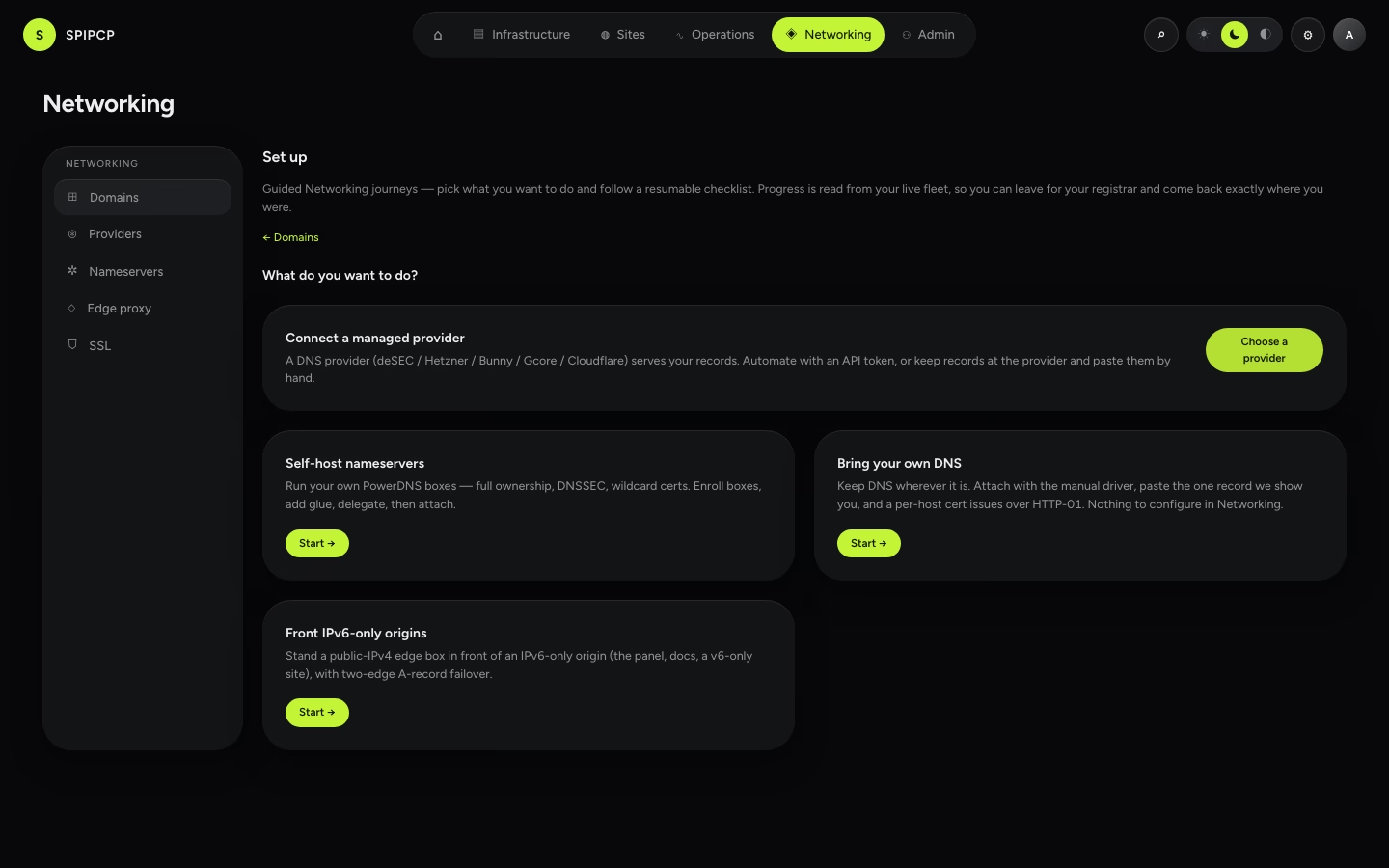
The Networking "Set up" surface turns each DNS posture into a resumable checklist whose progress is read from the live fleet — leave for the registrar, come back days later, and it shows exactly where things stand.
Every other Networking page organises the nouns — the Domains inventory, the Providers accounts, the Nameservers, the Edge routes, the SSL issuers — and each one opens with a table. Set up organises the verbs: "This domain needs to be on Cloudflare and the site just needs to work." It sequences the scattered steps (connect → test → attach → delegate) into one guided, resumable path so the order never has to be held in memory.
Reach it from the Set up button in the Networking ▸ Domains header — it's always there, not just on an empty install. It is a page, not a sixth nav item; it can be ignored entirely when the operator already knows the system, and every direct path (add an account, enroll a box, attach a domain) still works exactly as before. The guided layer is additive and opt-in.
What the Set up surface is
Pick a posture, and the panel shows a checklist for it. Each step's done-ness is read from the live fleet, never stored: an account row exists and tested green, a zone-list is cached, a nameserver box is healthy, glue resolves to the declared IP, the apex is delegated to the boxes, a domain is attached. The only thing SpipCP remembers is the intent — which journey, which provider, which domain — one small settings entry. Everything else is recomputed each time the page opens.
That single design choice is why the page is resumable by construction. Stopping halfway to go add glue records at the registrar, then returning three days later, the checklist shows precisely the steps still outstanding — no "where was I?", no stale progress that drifted from reality. Deleting the stored intent and restarting the same journey produces the identical checklist, because it was never a saved sequence of ticks — it's a live reading of the fleet.
One teaching home, tables everywhere else
Set up is the one page that teaches. The management pages (Providers, Nameservers, Edge, SSL) stay lean tables — a property of the domain-centric Networking pages. The depth that a summary sentence in the panel leaves out lives here and in the linked reference pages, so the checklist stays a one-sentence-per-step list.
The five journeys + the issuer tail
The chooser offers five journeys — one per DNS posture, plus the edge and app-customer-domains lanes — and an optional issuer step that every DNS journey grows a tail for. Which cards appear depends on the offerings switchboard — closing a posture drops its journey.
1 · Connect a managed provider
A DNS provider (deSEC, Hetzner, Bunny, Gcore, Cloudflare) serves the records. This is the fast path. First comes picking the provider — the journey lays the EU-first cards side by side with their capability matrix and "where to get a token" guidance, so "which one to use?" is answered by comparison before committing. Then the journey forks, asked in the provider's own name ("How should SpipCP work with Cloudflare?"):
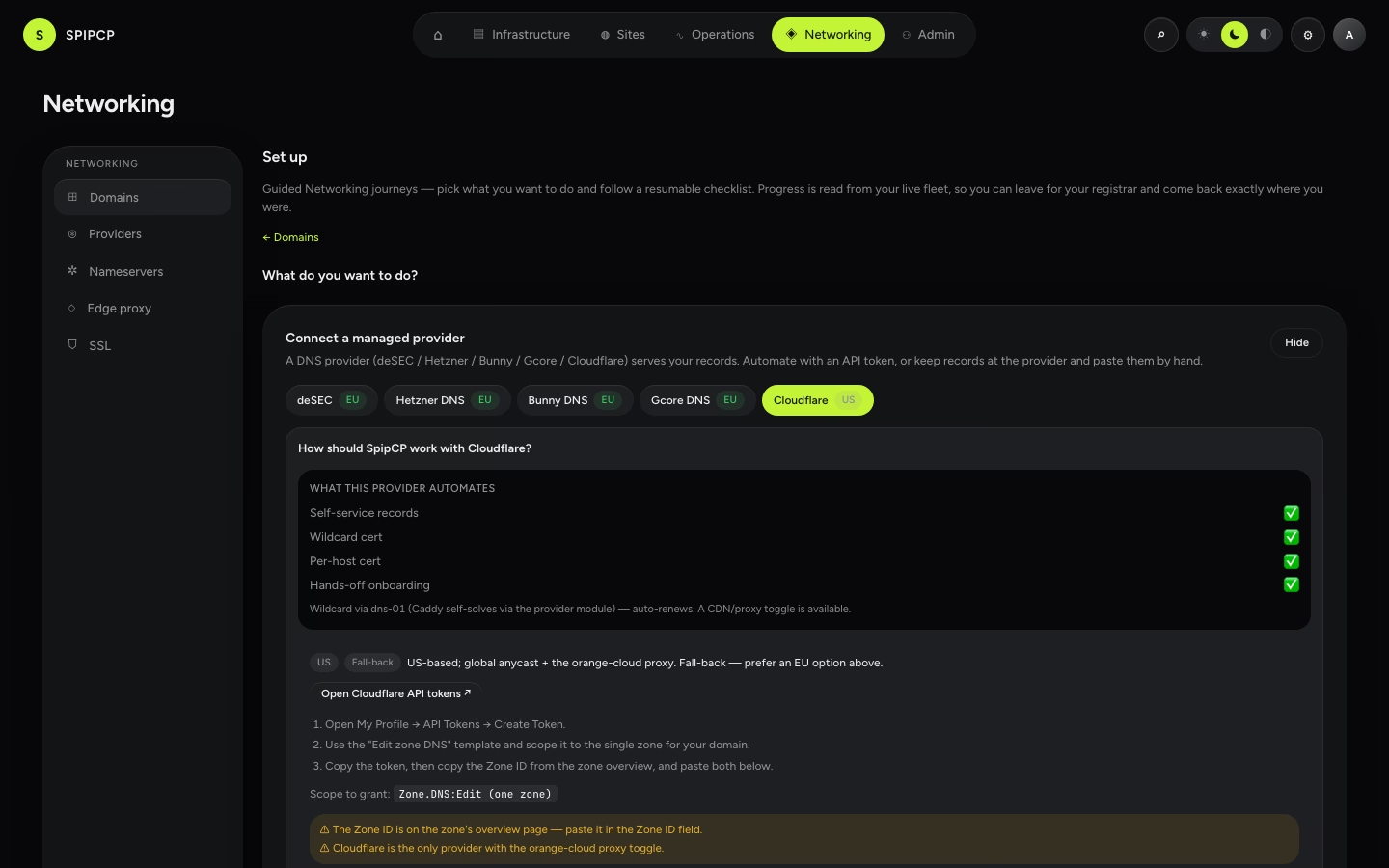
The two forks are a genuine, honest trade-off — not a right answer and a lesser one:
| Automate with an API token (recommended) | Manage records directly | |
|---|---|---|
| Credential in SpipCP | A DNS API token (encrypted, write-only, never sent to a node). | None. SpipCP holds nothing. |
| Who writes records | The panel, through the provider's API. | Done by hand, at the provider — SpipCP shows the exact record to paste. |
| Certificates | HTTP-01 or DNS-01. | HTTP-01, per host. |
Wildcard cert (*.example.com) | ✅ — DNS-01 writes the _acme-challenge TXT automatically. | ❌ — no credential means no way to write the TXT the wildcard proof needs. |
| Detected tier | Connected — the panel sees a matching zone in the account. | External — "NS at cloudflare.com (detected); records managed there." |
| Creates in Networking | A provider account + cached zone list. | Nothing. That's the point of the fork. |
The no-token fork is the posture that was previously invisible: the UI led with Add DNS account → API token field, so "nameservers at Cloudflare, records by hand" read as token-or-nothing. It is now a first-class, named choice — pickable by provider name, asking for zero credentials, ending with a working attached domain. Full detail of the tier it lands in and the wildcard/HTTP-01 trade lives on The External tier.
The token fork's steps
add the account (the Add-account dialog, provider preselected) → auto-test ✓ → zone list cached ✓ → (optional) set the account as a node/instance cascade default → attach the first domain → the optional issuer tail. The no-token fork collapses to: attach with the manual driver → the record resolves ✓ → done.
2 · Self-host nameservers
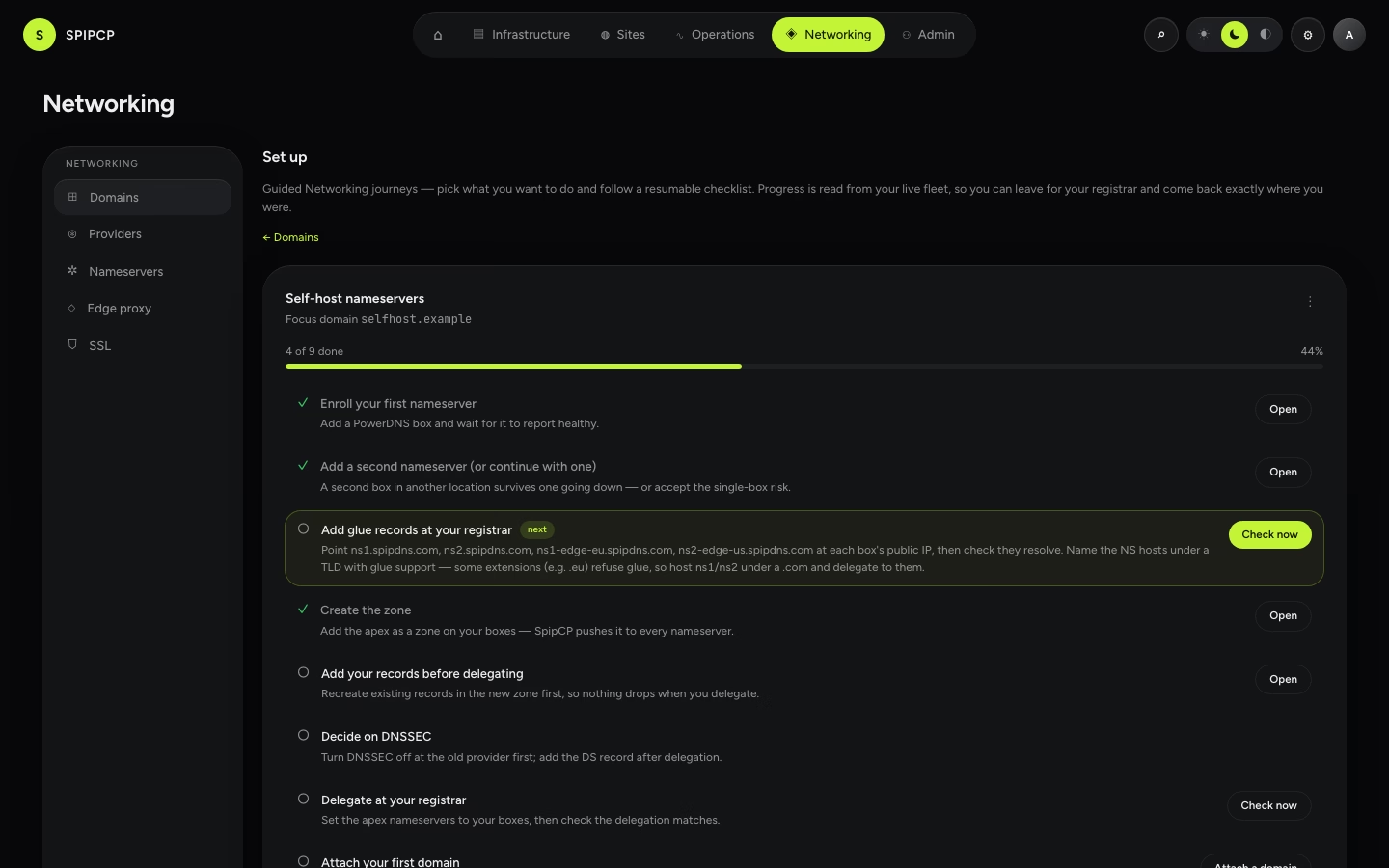
Run dedicated PowerDNS boxes — full ownership, DNSSEC, wildcard certs. This is the longest journey because it owns both DNS layers (delegation and records), and its whole value is sequencing steps that today live across two tabs, the registrar, and prose banners. The full order, as one checklist:
Box 1 enrolled and healthy — the Add-a-nameserver wizard opens inline; the step goes done when the box reports healthy.
Box 2 in a second location — two boxes are the point (the second is the backup). A single box shows an amber accept-risk affordance rather than a green tick — proceeding with one box is possible knowingly, but the panel never pretends it's redundant.
Glue records at the registrar — the copy-paste values from the glue wizard, plus Check now (see below): the panel resolves ns1.…/ns2.… from outside and compares against each box's declared public IP.
Create the zone — the Create-zone dialog inline, apex preseeded; done when the zone is active.
Add records — before delegating — the migration order matters (see the callout below). Paste the records the domain needs while the old provider is still authoritative, so the switch is dark-for-nobody.
DNSSEC decision — turn it off at the old provider first; register the DS record only after the new boxes answer. Detail: DNSSEC.
Delegate at the registrar + Check now — point the apex's nameservers at the new boxes; the check does an NS lookup and set-compares against the nameserver hostnames.
Attach the first domain — then the optional issuer tail.
Records first, then delegate — never the other way round
The single rule that governs go-live: records must exist on the boxes before delegation points at
them. Delegating first means that, hours later, cp.example.com can go dark because its record was never added.
The checklist enforces the order by putting add records ahead of delegate. Full walkthrough:
Delegate a domain.
Some ccTLDs won't register glue (.eu) — name NS under a gTLD
Registrars create glue (host records) for generic TLDs like .com/.net, but some ccTLDs — .eu
(EURid) is the notable one — disable the registrar's glue/Hosts screen entirely. If the served domain
is a .eu, the nameservers cannot be named ns1/ns2.example.eu. Name them under a glue-friendly
domain instead — a .com like spipdns.com — register the glue once there, then delegate every
domain (.eu included) to ns1/ns2.spipdns.com. See Setup.
3 · Self-managed DNS
The legitimised do-nothing path. Keep DNS wherever it is today, attach with the manual driver, paste the one record the panel shows, and a per-host certificate issues over HTTP-01. It creates nothing in Networking — and the checklist says so, on purpose. It exists so the chooser is exhaustive and so "no account needed" is a stated answer, not an absence to infer. Same honest trade-off as the managed no-token fork, minus the provider name: no credential means no wildcard, per-host HTTP-01 only.
4 · Front IPv6-only origins
The edge-proxy journey. When an origin (the panel, docs, or a v6-only site) has no public IPv4, a public-IPv4 edge box stands in front of it. The journey derives its preconditions (are there v6-only nodes? shown, not asked) → an edge box present (it rides the PowerDNS boxes, the 1.8 co-location guidance) → create the fronted route (the edge-route dialog inline) → the fronted hostname resolves to the edge's public v4 ✓ and health goes green ✓ (read from the existing multi-A failover health). It joins the chooser because it's the same "confusing order" problem in miniature.
5 · App customer domains
For an app hosted here that serves its customers' own domains — a status page on
status.client1.com, a client site on shop.client2.ie. Every control this needs already existed on
the site card, and that is exactly why the lane was hard to find: nothing in Networking, where an
operator looks for anything domain-shaped, said the capability was there. This journey is the front
door; it owns no control of its own, and each step opens the section of the site card that does.
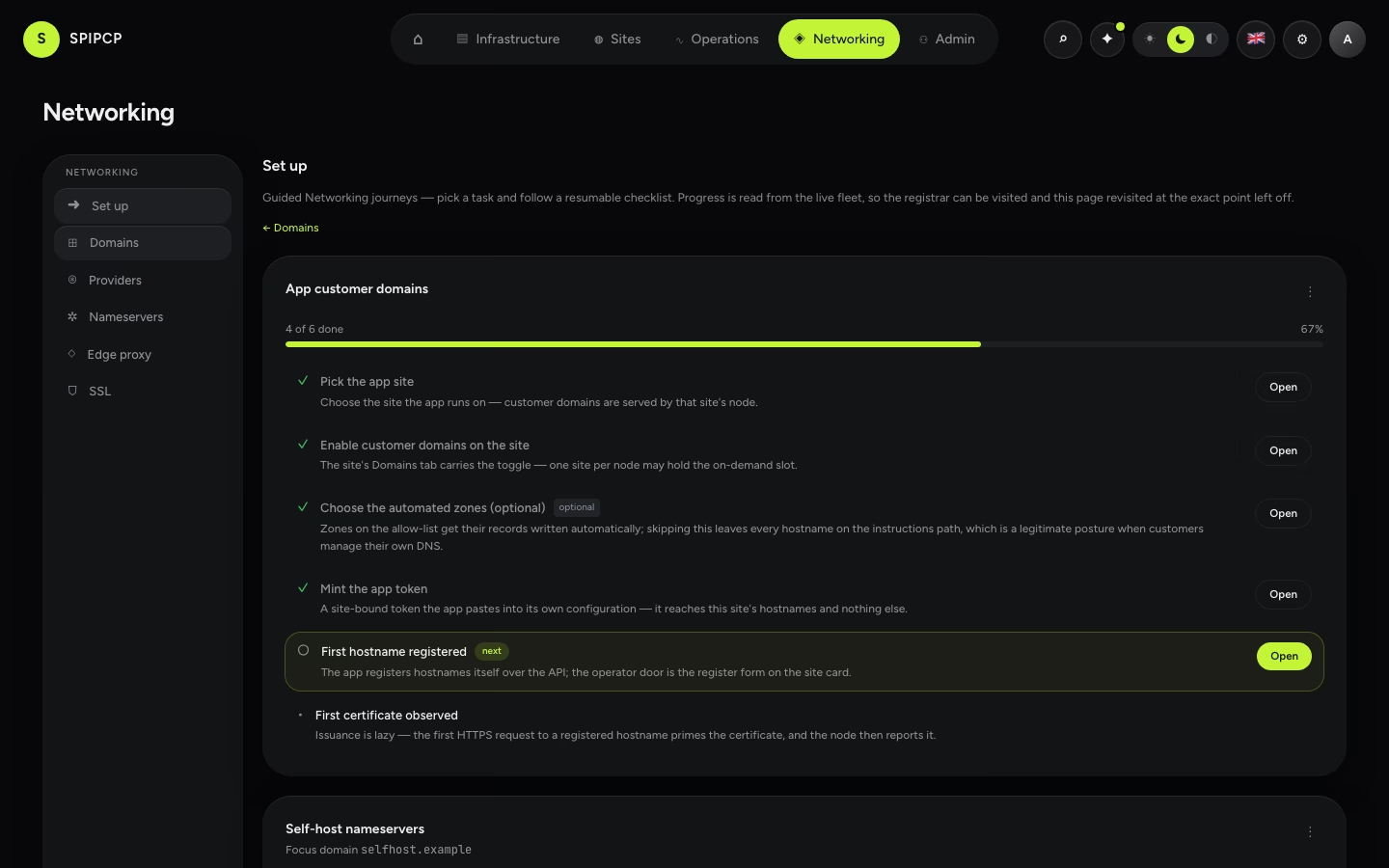
The six derived steps:
- Pick the app site — the one selector this journey adds. Customer domains are served by the site's node, so only node and docker sites are offered (the same eligibility the on-demand toggle enforces). No eligible site yet means launching one first.
- Enable customer domains on the site → the site's Domains tab, at the on-demand toggle. One site per node may hold the slot.
- Choose the automated zones (optional) → the allow-list editor. Zones listed here get their records written automatically; skipping this leaves every hostname on the instructions path, which is a legitimate posture when customers manage their own DNS. The step says so inline rather than nagging.
- Mint the app token → the site card's token dialog. The token is bound to that one site and goes into the app's own configuration; the API reference takes it from there.
- First hostname registered — the app registers hostnames itself over the API; the operator door is the "Add the record for me" form on the same card.
- First certificate observed — issuance is lazy, so the first HTTPS request to a registered hostname primes the certificate and the node then reports it. Advisory: not observed yet reads as waiting, never as a failure.
Entry points, one line each: an app should serve customer domains → Networking → Domains → Set up app customer domains. This one site needs wiring → Sites → site → Domains → Custom hostnames. While the journey is in flight, that card carries a chip back to the checklist.
The issuer tail
Every journey grows one optional trailing step for the certificate issuer, and its default state is already done: "Let's Encrypt is configured and needs nothing." Let's Encrypt is the zero-config answer for the 90% who never leave it. The step only becomes actionable when the posture needs more:
- Wildcard over manual DNS → a DNS-01 credential is needed (which is really the managed-token fork, or self-hosted nameservers — a wildcard is impossible with no credential to write the TXT).
- Org policy / an EU CA → add a ZeroSSL or Actalis account (both ACME with EAB).
- A private CA / a cert from elsewhere → upload a custom PEM (does not auto-renew).
When it upgrades, the step inline-opens the existing SSL issuer dialog, so the journey never grows a parallel form. Depth: SSL/TLS certificates.
"Check now" honesty
The glue and delegation steps are the ones the panel can't do automatically — they happen at the registrar — so they each get a Check now button that does a short-timeout, cached, panel-side lookup and reports what it saw, with a timestamp. It is honest about its own limits:
- Advisory, never a gate. A check never blocks the next step. DNS propagation lies, resolvers cache, and the most recent change may not be reflected yet.
- A red check means "not yet visible from here," not "misconfigured." Delegation can take minutes to hours to propagate; the panel resolves from one vantage point at one moment. A failing check is a display that hasn't caught up, never a wrong action.
- Cached, with an explicit refresh. The result and its
checkedAttimestamp are shown for freshness; clicking Check now again busts the cache and re-resolves.
This is the same posture the authority-tier detector and the attach pre-flight already take everywhere else: present what detection sees, store nothing, and let the real operation (the record write, the ACME exchange) be the source of truth.
The tiers get human subtitles
Wherever a tier badge renders — the Domains inventory, the attach wizard's pre-flight banner — it now carries a plain-language subtitle spelling out the detected nameserver: "External — NS at cloudflare.com (detected); records managed there." The internal vocabulary (Hosted / Connected / External) stays frozen; the subtitle is the human translation. And on an External row whose nameserver SpipCP recognises, the attach banner offers the fix as a cross-link — "Want automatic records and wildcards? Connect Cloudflare →" — which deep-links straight into the managed journey, provider preselected.
Where to go next
- Domains: the three tiers — the inventory the journeys populate, and the detected-tier model.
- The External tier & CDN caveats — the no-token / BYO trade-off in full.
- Run dedicated nameservers — the self-hosted posture end to end.
- SSL/TLS certificates — the issuer tail and the certificate matrix.
- Choose a setup — the scenario-level overview each journey deepens.
Docker site type
A site type that runs a containerized app from a compose file inside an instance — each app with its own directory, port, and route — served and managed like any other site.
DNS in SpipCP: the two layers
The one model that prevents most DNS confusion — delegation (the nameservers, set at the registrar) versus the records (A/CNAME/TXT, inside whoever is authoritative) — then a posture to pick.