SSL/TLS certificates
The full SpipCP certificate matrix — per-host and wildcard, managed and self-hosted, custom (self-supplied) PEM — the fleet cert dashboard, and the passthrough guarantee that TLS terminates on the serving node.
Every attached domain gets a TLS certificate, and SpipCP issues and renews it automatically for almost every path. This page is the certificate home: the eight scenarios SpipCP supports, the fleet dashboard that rolls them up, and the one architecture guarantee that underpins them all — TLS terminates on the serving node, never upstream.
The certificate authority is set on the issuer cascade; this page is about the mechanism — how the cert is obtained and kept valid for each kind of domain.
The issuer tail of a guided journey
Every guided setup journey ends with an optional issuer step, and its default state is already done: "Let's Encrypt is configured and needs nothing." LE is the zero-config answer for almost everyone. The step only turns actionable when the posture needs more — a wildcard over manual DNS (which needs a DNS-01 credential, i.e. the managed-token or self-hosted path), an org policy that wants an EU CA (ZeroSSL / Actalis over EAB), or a private CA (a custom PEM). Then it inline-opens the SSL issuer dialog — no separate form.
The SSL page: issuers + scenario coverage
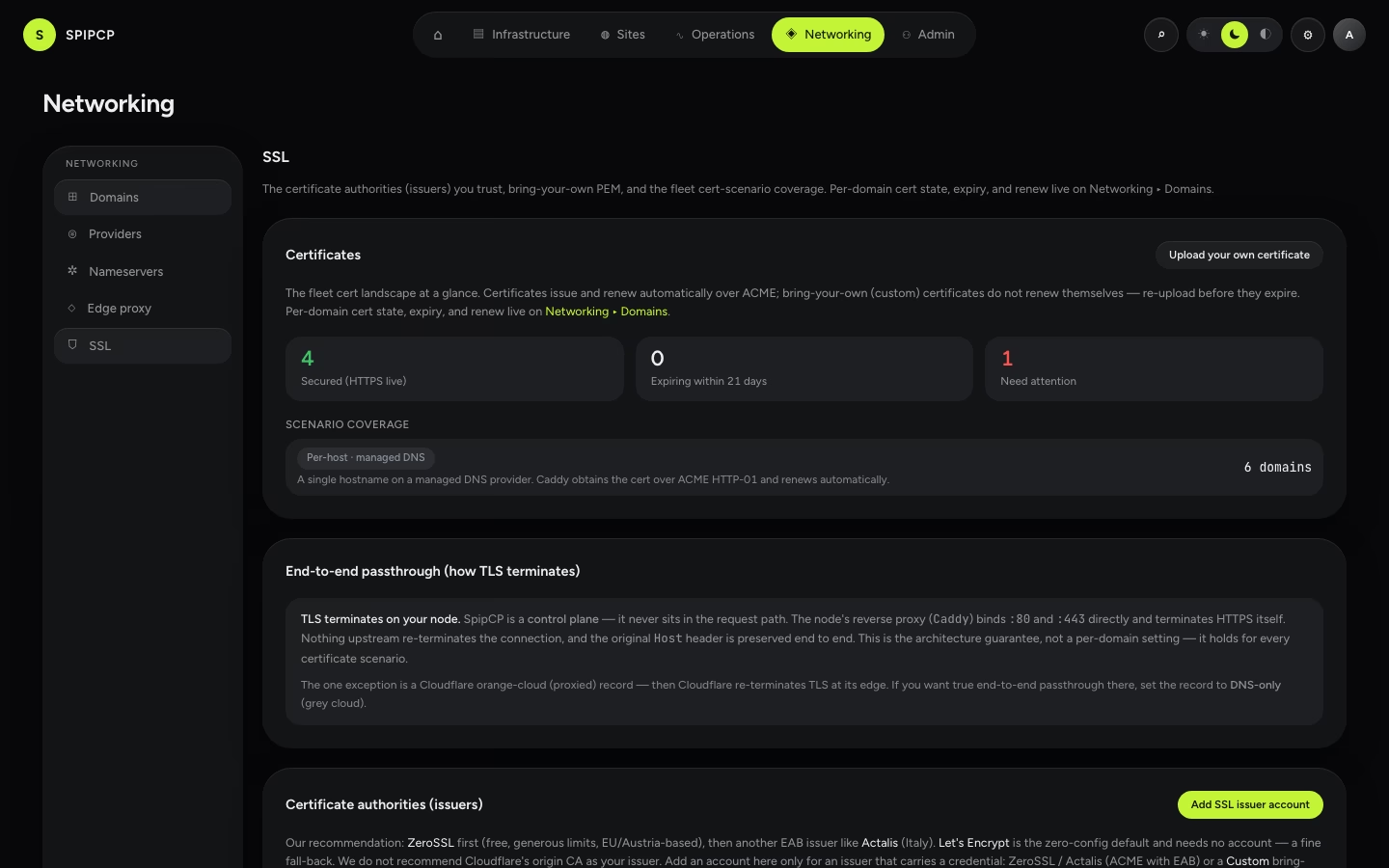
Networking → SSL holds the trusted certificate authorities (issuers), custom PEM upload, and a scenario-coverage summary — a count of how many domains fall into each of the eight scenarios below, plus a secured / expiring / failed strip.
Per-domain cert state lives on Domains
The per-domain certificate rows — hostname, issuer, cert state, expiry, and Renew now — moved to the Networking ▸ Domains inventory, because cert state is a property of a domain. The SSL page keeps the issuers and the scenario landscape; open Domains to act on a specific certificate.
The eight scenarios
SpipCP enumerates a frozen list of certificate scenarios — the same list the live test rig issues and verifies one by one, so the supported list and the tested list can never drift.
| # | Scenario | Mechanism | Renewal |
|---|---|---|---|
| 1 | Per-host, managed DNS (roadmap.app1.com) | ACME HTTP-01 | auto (Caddy) |
| 2 | Per-host, self-hosted DNS | ACME HTTP-01 | auto (Caddy) |
| 3 | Wildcard, managed DNS (*.roadmap.x) | ACME DNS-01 via caddy-dns/<provider> | auto (Caddy) |
| 4 | Wildcard, self-hosted DNS | ACME DNS-01 via caddy-dns/powerdns | auto (Caddy) |
| 5 | Custom (self-supplied) PEM | static load_pem loader | manual re-upload (warned) |
| 6 | Manual DNS + per-host | ACME HTTP-01 (record added by hand) | auto (Caddy) |
| 7 | End-to-end passthrough (every above) | TLS terminates on the serving node | n/a |
| 8 | On-demand, customer hostname (status.client.com) | ACME HTTP-01, issued lazily at the first handshake | auto (Caddy) |
Scenarios 1, 2 and 6 are single-hostname certificates over HTTP-01 — the simplest path, needing no DNS credentials at all. Scenarios 3 and 4 are wildcards, which need DNS-01 (see below). Scenario 5 is a certificate supplied directly. Scenario 7 isn't a per-domain choice — it's the architecture guarantee that applies to all of them.
Scenario 8 is different from the operator-attached rows above: the hostname belongs to the app's
customer, so nobody attaches it in the panel. When the customer's domain first arrives over HTTPS,
Caddy issues the certificate on demand — authorized by the app's own ask endpoint — and the panel
only observes it. That's the Custom customer domains feature; app
authors implement the ask contract.
Wildcards need DNS-01
A wildcard certificate (*.roadmap.x) can only be issued over the ACME DNS-01 challenge. HTTP-01
proves control of one exact hostname at a time, so it can never prove control of *. DNS-01 instead
writes an _acme-challenge TXT record, which proves control of the whole zone.
That means a wildcard needs a credential that can write DNS records — and where that credential lives decides the path:
- Managed provider — Caddy on the serving node self-solves DNS-01 through the matching
caddy-dns/<provider>module (deSEC / Hetzner / Bunny / Gcore / Cloudflare). Auto-renews. - Self-hosted nameservers — now also wildcard-capable. Caddy self-solves DNS-01 against the
dedicated PowerDNS box through the compiled
caddy-dns/powerdnsmodule, keeping the same automatic renewal as the managed lane. See self-hosted wildcards. - Manual (BYO DNS) — not available. SpipCP has no credential to write the
_acme-challengeTXT, so the attach is blocked with an actionable message rather than silently issuing only the apex. A manual domain can still get a per-host cert over HTTP-01.
Self-hosted wildcards are new
Until recently, a self-hosted PowerDNS zone could only get per-host (HTTP-01) certificates. The
self-hosted lane now self-solves DNS-01 via the caddy-dns/powerdns module, so the self-hosted
posture is fully wildcard-capable — matching the managed providers and keeping auto-renew.
Custom certificates
For a certificate already held from elsewhere, use Networking → SSL → upload a custom
certificate to paste the certificate chain and private key (the custom issuer). Caddy serves it
statically via its load_pem loader.
There is no auto-renew for a custom certificate — there's no ACME exchange to renew. SpipCP parses the certificate, tracks its expiry, and warns as it nears expiration (amber within 21 days, then a probe alert); the remedy is to Edit the account and paste a fresh PEM before it lapses. The private key is encrypted at rest and is never returned to a client. Full details are on SSL issuer accounts.
The passthrough guarantee
SpipCP is a control plane, not a proxy — it never sits in the request path. It generates a Caddy
configuration and pushes it to the node's own Caddy over the admin API; the node's Caddy binds
:80/:443 directly. Therefore:
- Ports 80 and 443 reach that Caddy untouched. Nothing intercepts the ACME challenge or rewrites the Host header, so Host-header routing (the heart of a multi-tenant app) is preserved end to end.
- TLS terminates on that box. The panel never holds a private key for the traffic — encrypted traffic passes straight through to the node.
This isn't a per-domain toggle; it's a property of the architecture, so it holds for every scenario above.
The one exception — Cloudflare's orange-cloud proxy
If Cloudflare's orange-cloud proxy is turned on, Cloudflare's edge terminates TLS and masks the origin — so it, not the node, terminates the connection. SpipCP detects this (the record resolving to Cloudflare edge IPs) and surfaces a prompt to set the record to DNS-only (grey cloud) to restore true end-to-end passthrough. The orange cloud is a Cloudflare-only feature.
Next steps
- Managed DNS providers — the cascade and the per-provider caddy-dns module.
- Run dedicated nameservers — the self-hosted posture, now wildcard-capable.
- SSL issuer accounts — choosing the certificate authority (the issuer cascade) and uploading a custom PEM.
- Domains & SSL — the per-domain attach flow and the per-site SSL dashboard.
The External tier & CDN caveats (Cloudflare, Bunny, …)
What "External" means as a detected authority tier, how to create the records SpipCP asks for by hand, and the per-provider caveats (Cloudflare orange-cloud, etc.).
Run dedicated nameservers
Own DNS end to end by running PowerDNS on cheap VPS as nameserver nodes. The trade-offs (two boxes, the upkeep, no anycast), how it works, and why it's worth it for data ownership.