Disaster recovery
What happens to a fleet if the panel itself is lost — and the three ways back. The recovery kit generated at setup, restoring the panel from a backup, claiming still-running agents over their own connection, and break-glass into a hardened node.
The panel is a control plane, not a runtime — nodes, instances, and sites keep running even if the panel goes away (re-adopt covers reconciling workloads after the panel forgets them). But there is one thing only the panel holds that the nodes cannot rebuild on their own: the keys to get back to them.
This page is about that: how a panel loss can lock a fleet out from itself, and the layered ways to make sure it never does.
Why a panel loss can lock the fleet out
When a node is enrolled, the panel connects over SSH once to install a small agent, then hangs up. From then on the agent dials out to the panel over a secure WebSocket — that connection, not SSH, is the control channel. The agent's first job is to harden the box, which turns off password login and root SSH.
That hardening is what makes a panel loss dangerous. After a database wipe the panel no longer holds:
- the per-node token the agent authenticates with, so a still-running agent is no longer recognised;
- the SSH credential originally used to enroll; and
- even where it survived, sshd now refuses passwords — so the original password is rejected too.
The result: a hardened node, a forgotten panel, and no obvious way back in. Everything below exists so that situation is either prevented or quickly recoverable.
The two secrets to carry out of band
All recovery ultimately rests on two bootstrap secrets surviving a panel loss: MASTER_KEY (decrypts
every stored credential) and AGENT_GATEWAY_SECRET (lets agents re-authenticate). The recovery
kit below is the easiest way to keep both safe. Keep the backup's repository password separate from
the kit.
Layer 1 — Generate a recovery kit at setup
The chicken-and-egg problem with a panel backup is that it needs somewhere to go and a key to decrypt it — and at first boot neither is configured yet. The recovery kit closes that gap. It is a small, passphrase-encrypted file generated the moment setup finishes.
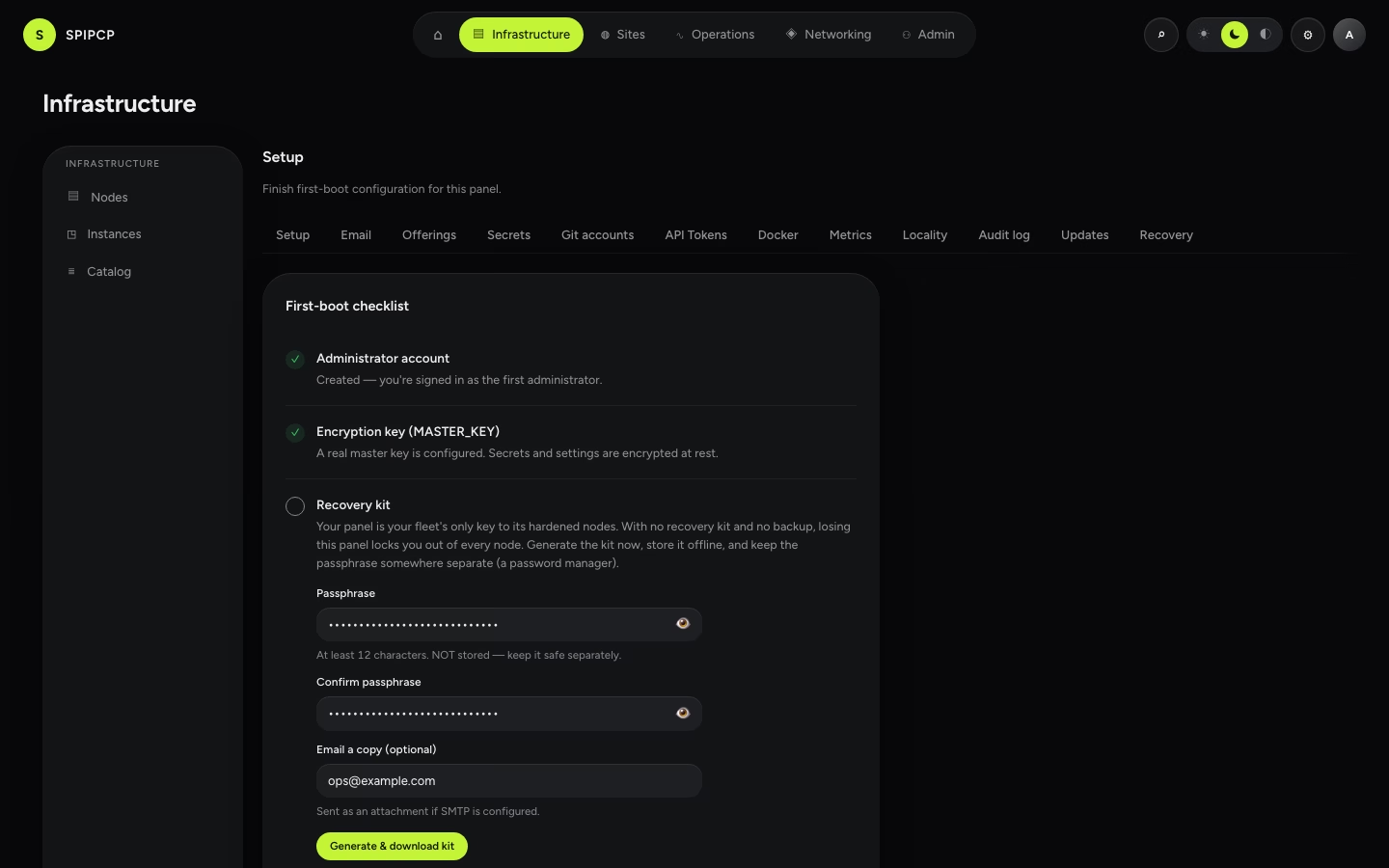
The kit contains the four boot secrets (including MASTER_KEY and AGENT_GATEWAY_SECRET) plus
non-secret restore hints (the panel hostname and where the backup target lives). It does not
contain the backup's repository password — that stays separate, so a leaked kit and a leaked backup
can't be combined.
Set a real MASTER_KEY first. The wizard refuses to make a kit under the development placeholder —
a kit made then would be useless.
Choose a passphrase (≥ 12 characters). It is never stored, logged, or emailed — it's the only thing that opens the kit, so it belongs somewhere separate from the file (a password manager).
Generate. The kit downloads immediately, and — when an email is provided and SMTP is configured — a copy is sent as an attachment. The email body carries no secret; only the encrypted attachment.
Store it offline and confirm. Click I've saved it safely to clear the checklist step. Re-generate the kit whenever a boot secret rotates.
Re-generate after a rotation
An old kit carries stale secrets. If MASTER_KEY, BETTER_AUTH_SECRET,
AGENT_GATEWAY_SECRET, or the database password rotates, generate a fresh kit.
The recovery-at-risk warning
Because the kit is the safety net, the panel watches whether one actually exists. When a fleet has nodes but no saved recovery kit and no successful panel backup, the dashboard shows a red banner — losing the panel right now would lock the fleet out, and this is the one warning that says so.
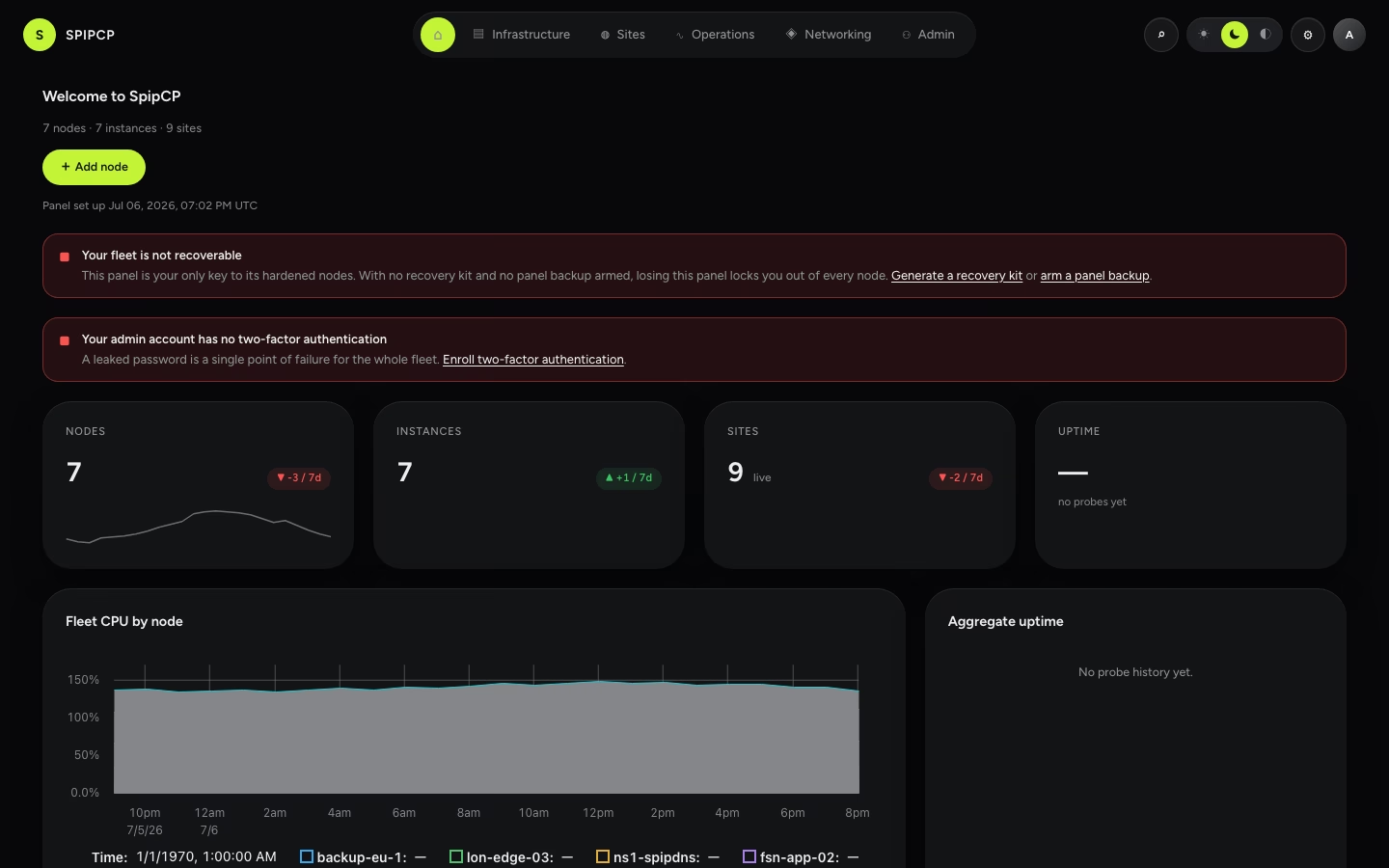
It clears as soon as either leg is in place: a saved recovery kit or a successful panel self-backup.
Layer 2 — Restore the panel from a backup
The cleanest recovery is to bring the panel's database back. With a panel self-backup armed (see Backups), restoring it into a fresh VM at the same hostname lets the still-running agents reconnect on their own — no SSH, no per-node steps. The full procedure, timed for under 30 minutes, is the migrate / restore the panel runbook.
The recovery kit is the out-of-band source for the boot secrets that runbook needs.
Feeding the kit's secrets in — the two install paths
A restore is, at bottom, standing the panel stack up on a fresh box whose .env carries the same
four boot secrets as the lost panel. The kit is where those secrets come from; how they reach .env
depends only on how the panel is installed.
Open the kit on any machine with the source checkout. The passphrase is read from
SPIPCP_KIT_PASSPHRASE (or prompted for) — never passed as a flag:
SPIPCP_KIT_PASSPHRASE=… node scripts/recovery-kit.mjs spipcp-recovery-2026-06-29.kit --env--env prints exactly the four KEY=value boot-secret lines — MASTER_KEY, BETTER_AUTH_SECRET,
AGENT_GATEWAY_SECRET, POSTGRES_PASSWORD — and nothing else, so it can be redirected straight into
an .env. (Run it with no flag to print a non-secret summary instead — what's inside, without the
values.)
The installer opens the kit itself — one command on the fresh box:
SPIPCP_KIT_PASSPHRASE=… ./install.sh --repo <git-url> \
    --recovery-kit spipcp-recovery-2026-06-29.kit \
    --panel-backup panel.sql          # optional — omit for a kit-only re-pair
It seeds the four boot secrets into .env, brings the stack up, and — when --panel-backup is given
— restores the database dump afterwards. Nothing else to do; the agents reconnect on their own.
The source path writes the box .env by hand (deploy never rsyncs .env), so the kit plugs into
that one existing step — the four boot secrets come from the kit instead of being generated fresh:
From a workstation with the checkout, open the kit and copy the four printed lines into the fresh box's
/opt/spipcp/.env, alongside the non-secret vars (SITE_ADDRESS, TLS_MODE, WORKER_WSS_URL,
PANEL_IP, BETTER_AUTH_URL) — kept at the same hostname / IP the old panel used:
SPIPCP_KIT_PASSPHRASE=… node scripts/recovery-kit.mjs <kit> --envDeploy the stack from the clone: pnpm deploy. It builds the image on the box and brings everything
up with the restored identity.
With a database backup (a full restore), load the dump once the stack is up:
ssh <box> 'cd /opt/spipcp && docker compose exec -T db psql -U spipcp -d spipcp' < panel.sqlWithout a backup (kit-only), skip this — the panel comes up empty but with the right identity, and the agents call home to be claimed (Layer 3 below).
Either way the outcome is the same: the rebuilt panel boots as the same panel — the matching
MASTER_KEY decrypts any restored data and the matching AGENT_GATEWAY_SECRET is what every hardened
agent re-authenticates against.
Layer 3 — Claim agents calling home (no SSH)
If a blank panel is restored into — or a new one is stood up from just the recovery kit's secrets — the agents on the nodes keep dialing home. A panel that doesn't recognise them does not drop them: it quarantines them, holding the connection open with no control over the box, and lists them for review.
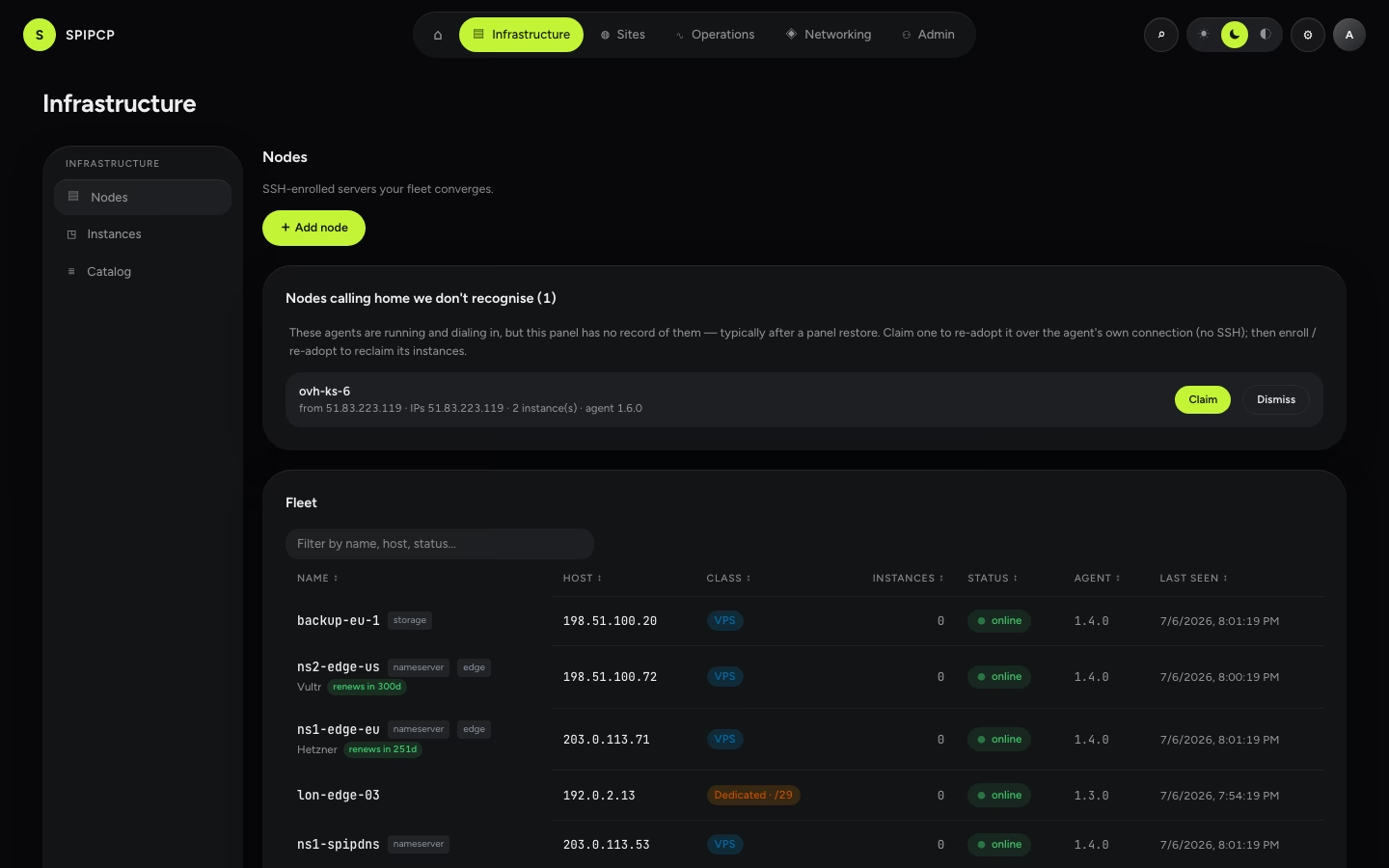
Review. Each quarantined agent shows the facts it reported — hostname, addresses, how many instances it's running — so its identity can be confirmed before acting.
Claim. Claiming back-fills the node's record and re-uses the token the agent is already presenting, so its very next connection authenticates — with no change on the box and no SSH.
Re-adopt its workloads. Once the node is managed again, run Re-adopt to reclaim the instances and sites still running inside it.
Why this is safe
A quarantined agent can do nothing — the panel never sends it a command and it never counts as online until claimed. Quarantine is rate-limited per source address, and claiming is an explicit, audited action. A random host on the internet can neither flood the list nor gain any trust.
Layer 4 — Break-glass into a hardened node
With no backup, no kit, and the agent unable to reach the panel, the only trust root left is the
hosting provider. Boot the server into the provider's rescue mode (or use IPMI/KVM), mount the root
disk, and either re-enable password SSH or add a fresh key — then re-enroll and
re-adopt. Step-by-step, per-provider instructions are in the
break-glass runbook shipped with the source
(runbooks/break-glass-node.md).
This is the slow, manual path — the layers above exist so it's rarely needed.
In one table
| Available… | Recover by… | SSH needed? |
|---|---|---|
A panel backup + repo password + (kit or MASTER_KEY) | Restore the panel — agents reconnect unattended | No |
| No backup yet, but the recovery kit | Stand up a panel from the kit's secrets, then claim the calling-home agents | No |
| Neither backup nor kit | Provider rescue/KVM into each box, then re-enroll + re-adopt | Yes |
The takeaway: generate the recovery kit at setup and arm a panel backup. With either in place, a panel loss is an unattended reconnect — never a lock-out.
Backups
Back up sites and the panel itself with restic — deduplicated, encrypted, append-only — on a schedule or on demand, with a policy that cascades from the fleet down to a single app and a safety floor that won't delete the last good backup.
Storage nodes
Provision a backup-only box, self-owned — it runs restic's rest-server in append-only mode, so a compromised site can add backups but never delete its own history. One dependency, enrolled like any other node.