Storage nodes
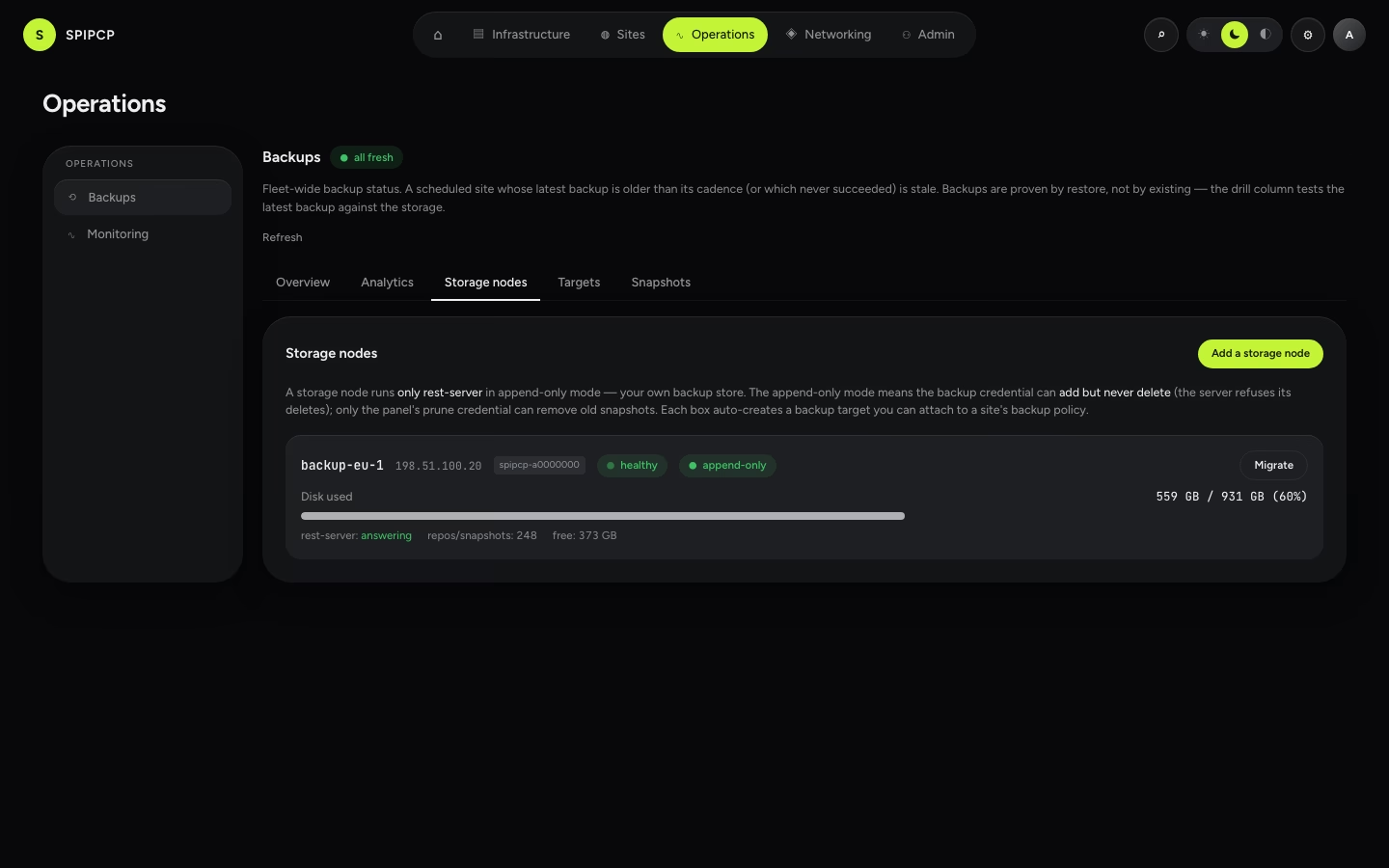
Provision a backup-only box, self-owned — it runs restic's rest-server in append-only mode, so a compromised site can add backups but never delete its own history. One dependency, enrolled like any other node.
A storage node is a self-owned backup-only box. It's enrolled exactly like any other node — give SSH
access — and SpipCP installs and configures one thing on it: restic's rest-server, run in
append-only mode. Every site (and the panel itself) then backs up to that box, and the box's
backup target appears in every backup-policy picker automatically.
Why rest-server (and not Garage / SeaweedFS / RustFS)
The whole point of a storage node is immutability: a site that gets compromised must be able to write a new backup but never delete an old one — so an attacker can't wipe the history and leave no restore point. That requires the storage server itself to refuse deletes on the backup credential.
rest-server does exactly that with its --append-only flag: the backup user can PUT new data but
the server rejects every delete, server-side, no matter what the client asks. That's a hard
guarantee, not a hope.
Why not a self-hosted S3-compatible object store?
Self-hosted S3 stand-ins — Garage, SeaweedFS, RustFS — are great object stores, but none
of them can enforce append-only / object-lock today. Without server-enforced immutability, a
compromised client with the bucket key can delete objects, which defeats the purpose. So a self-hosted
storage node runs rest-server, which can enforce it. (For object-store immutability, use
a managed provider that supports object-lock — AWS S3 or Cloudflare R2 — see
Bring your own storage.)
One dependency
rest-server is the only thing SpipCP installs on a storage node — a single static binary plus its
systemd unit. No database, no object-store cluster, no second moving part to operate or patch. The box
is "a disk with one daemon in front of it," which is what makes it cheap to run and easy to trust.
Add a storage node
Add a storage node enrolls a fresh VPS the same way adding a regular node does:
- Point it at a fresh box — give the host and SSH access. Any current Ubuntu LTS on a provider with a big disk works (this box is just storage).
- The panel installs and configures
rest-server, in append-only mode, with two credentials: an append-only backup user (the lane every backup writes through) and a separate, loopback-only prune user (the only lane that can delete — used by the retention pruner, never by a backup). No credential is ever typed by hand. - On success the box's backup target appears in every site's backup-policy picker and in the panel self-backup target — automatically.
Data disk — NVMe vs HDD (automatic)
Storage VPSes pair a small fast disk (the OS, often a 5–10 GB NVMe) with a big slow disk for data (the HDD — 500 GB, 1 TB, more). SpipCP puts each piece where it belongs, automatically:
- The backups (the GBs) go on the big HDD — that's the whole point of the box.
- rest-server's binary, its credentials file, and its working cache stay on the fast NVMe — small, hot, and they make every backup/restore faster.
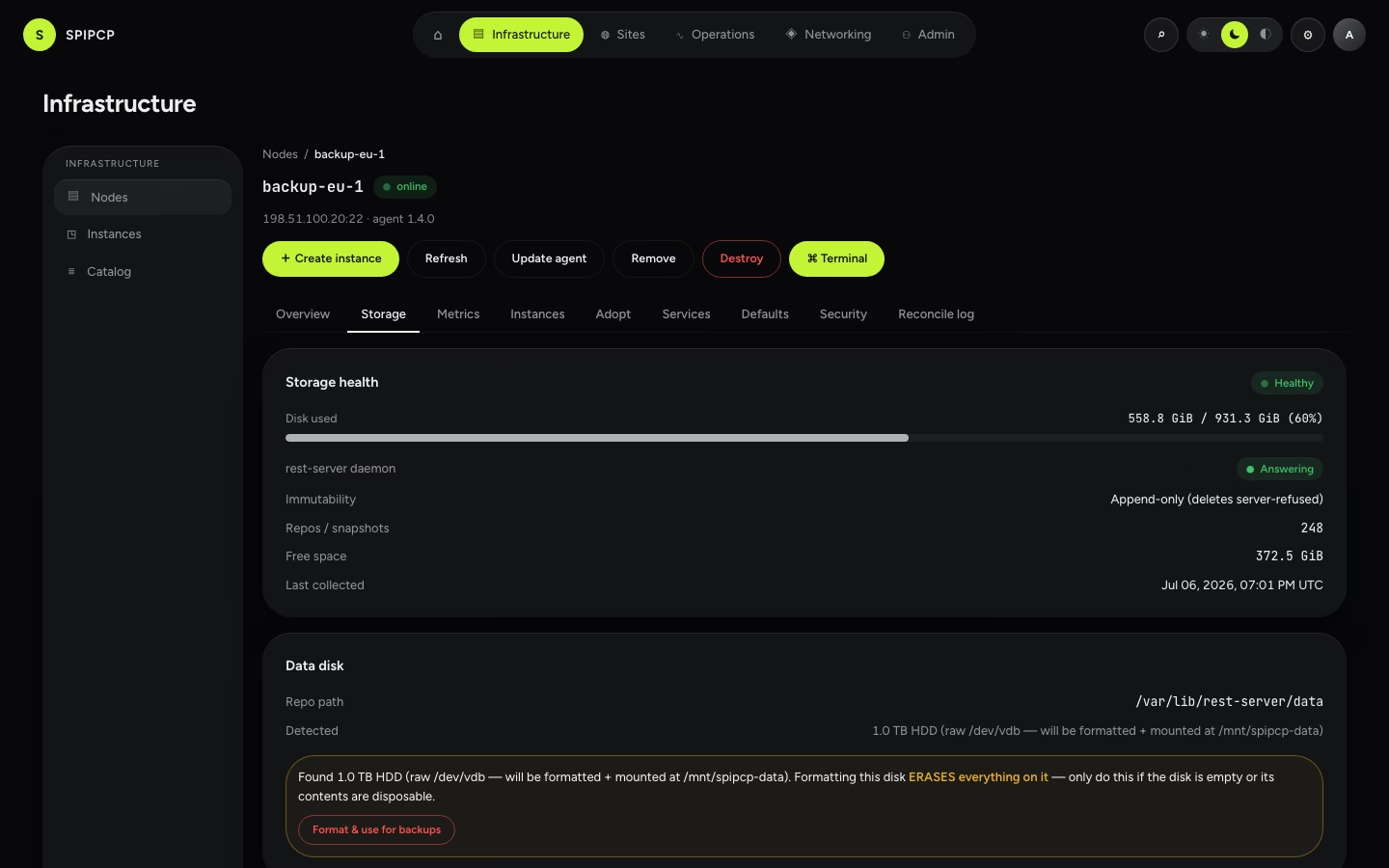
No upfront configuration is needed. When the box boots and first reports in, SpipCP reads its disks and decides:
| What it finds | What happens |
|---|---|
| A big data disk already formatted + mounted | The repo moves onto it automatically — no clicks. |
| A big data disk that's raw (most providers ship the HDD unformatted) | The storage node's Data disk card shows it and offers “Format & use for backups.” A click and confirm makes SpipCP format it (ext4), mount it, and persist the mount across reboots. |
| One disk only (a small box) | Backups live on the root disk — fine for a few sites. |
Formatting always asks first
Formatting a disk erases it, so SpipCP never does it automatically — it only formats a disk that is explicitly confirmed on the Data disk card, and only a disk that is raw, unmounted, and not the OS disk (three independent safety checks refuse anything else). An already-mounted disk is used as-is, never wiped.
Which box — and how much space?
A storage node is disk-bound, not CPU-bound: restic is light (1 vCore / 2 GB RAM is plenty), so the only number that matters is how much backup history fits. Two things shrink that number favourably:
- Dedup. restic stores each unique chunk once. Backing up a site daily for a month is not 30× its size — it's roughly its size plus the daily changes. Keeping lots of snapshots is cheap.
- Compression + client-side encryption are built in; the repo is smaller than the raw files.
Rough per-thing footprint in the repo (after dedup, one site's full history):
| Workload | Typical repo footprint |
|---|---|
| Static site | a few hundred MB |
| WordPress | ~1–3 GB (uploads dominate; the DB is small) |
| PHP / Laravel app | ~1–2 GB |
| Node app | ~1 GB (most of node_modules dedups) |
| Docker app | ~2–8 GB (named volumes + image data) |
So as a planning rule: sum each thing's unique data, multiply by ~1.3 for headroom, and ignore the snapshot count. A 500 GB box comfortably holds the backup history of ~30–60 WordPress sites (or ~20–40 Docker apps); a 1 TB box roughly doubles that. When a box gets close to full, the capacity bar on its health card goes amber, and the retention pruner (with its safety floor) keeps it in check.
The health card
Each storage node shows a health card with the box's status at a glance:
| Field | What it tells |
|---|---|
| Daemon | Is rest-server up and reachable? |
| Append-only | The immutability posture — backups can add, never delete. |
| Capacity | A bar of used / free disk, showing the box filling up before it's full. |
| Repos / snapshots | How many restic repositories and snapshots the box holds. |
| Last error / checked | The last collection error (if any) and when the facts were last refreshed. |
The two-credential split that makes the append-only lane real is explained in Append-only & immutability.
Disaster recovery
What happens to a fleet if the panel itself is lost — and the three ways back. The recovery kit generated at setup, restoring the panel from a backup, claiming still-running agents over their own connection, and break-glass into a hardened node.
Bring your own storage
Send backups to an S3 bucket (AWS, Cloudflare R2, IONOS, Hetzner) or an SFTP server. Set the credentials, test the connection, and turn on provider object-lock where it's supported.