Failover
Why two nameservers give automatic failover with nothing to configure — resolvers try each NS in turn. What the panel's NS-health probe watches, and what to do when a box goes unreachable.
Self-hosted DNS needs two boxes because that's how DNS gives failover for free — as long as both boxes are listed as nameservers for the domain.
Why two nameservers = automatic failover
When a domain is delegated, its parent lists both
ns1.spipdns.com and ns2.spipdns.com as authoritative. A resolver that needs an answer tries one
and, if it doesn't respond, tries the other. There's no switch to flip, no health check to configure,
no failover service — it's how every resolver on the internet already works.
        ┌──────────────────────────────────┐
        │   A resolver needs example.com   │
        └────────────────┬─────────────────┘
                         │  parent lists BOTH as authoritative
            ┌────────────┴─────────────┐
            ▼                          ▼
      ns1.spipdns.com            ns2.spipdns.com
            │                          │
       ✗ no response              ✓ answers
       (box down)                 (returns the record)
            │                          │
            └────────────┬─────────────┘
                         ▼
            the resolver gets its answer
       no switch to flip · no health check · built in
This is also why SpipCP writes records to each box separately: both boxes hold the full, current zone on their own, so either one can answer completely. One box being down never produces a wrong answer — only a slightly slower one while the resolver retries the surviving box.
Both boxes hold the whole zone
Failover only works because both boxes have the whole zone. SpipCP pushes every zone and record change to each box separately — there's no "primary" whose loss leaves a stale or empty backup. That's what makes the failover real rather than theoretical.
What the panel monitors
The Nameserver boxes tab under Networking → Nameservers runs a continuous health check on each box and shows it on the dashboard:
| Check | What it means |
|---|---|
| Reachable | The box responds to the panel (its agent is connected). |
| PowerDNS answering | It serves authoritative answers on port 53. |
| Glue verified | ns1/ns2.spipdns.com still resolve to the right IPs at the registrar. |
| Zones in sync | The box holds the zones the panel expects, so it can fully answer. |
A green pair means both boxes can serve every domain on their own. A box that goes amber or red shows here before it causes an outage.
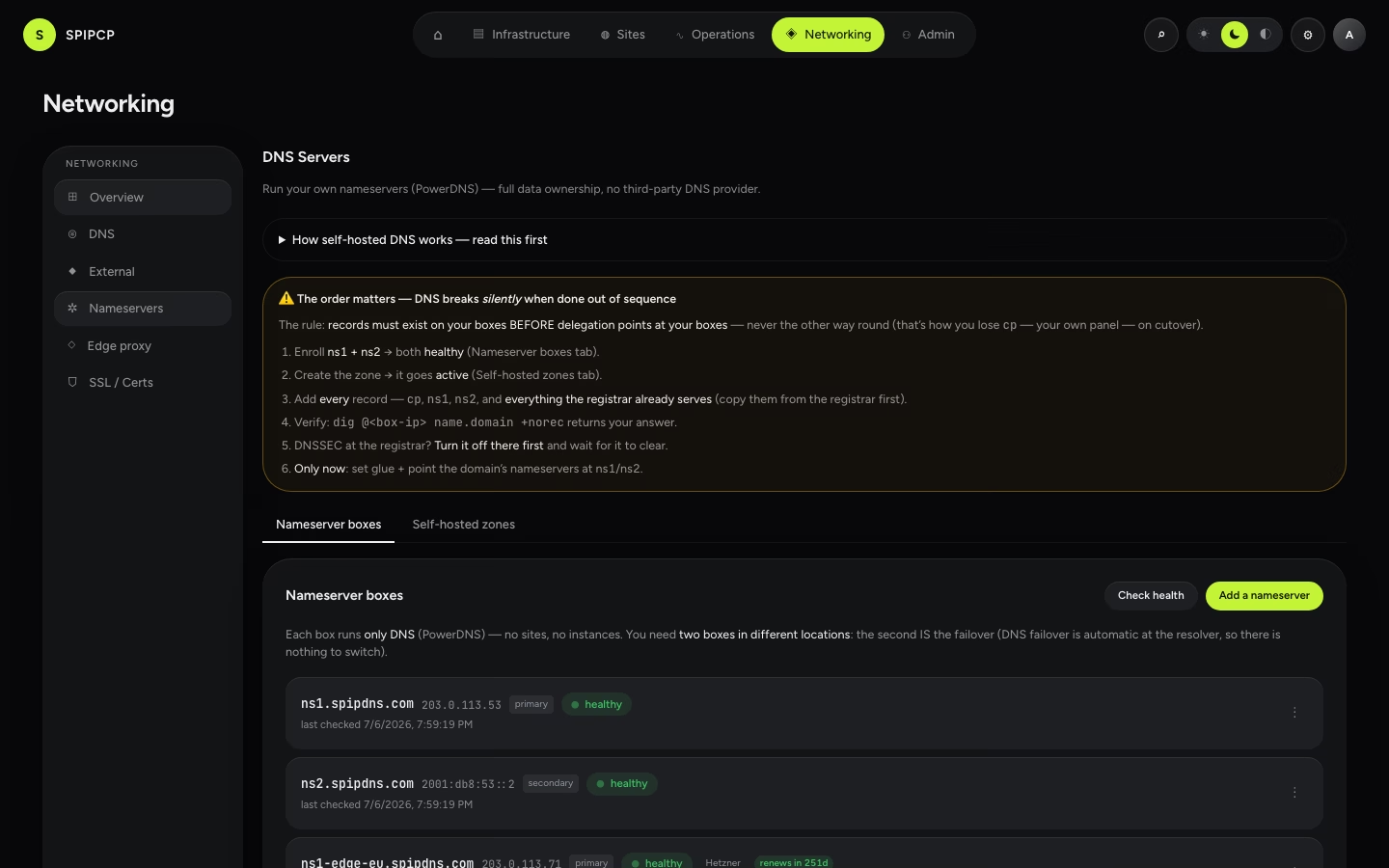
When a box goes unreachable
The whole point of two boxes is that one down is not an outage — the surviving box keeps every domain resolving. But it is a warning: the setup is now running on a single point of failure until it's fixed.
Fix ns2 before ns1 also fails
If a box goes unreachable, domains stay up on the other one — but the safety margin is spent. Treat a single down nameserver as urgent, not an emergency: restore or replace it before the second box can also fail. Two boxes down at once is an outage for every self-hosted domain, so a half-down pair should never sit unattended.
To recover a box, bring the VPS back, or enroll a replacement as a nameserver node in the setup flow. The panel reinstalls PowerDNS and re-pushes every zone, and the health check goes green again. Because the parent already lists both nameservers, a restored box starts taking traffic automatically — nothing to re-delegate.
Next steps
- Self-hosted overview — how writing to each box separately makes this work.
- Set up nameservers — enroll or replace a nameserver box.
- DNSSEC — signing, on top of the failover pair.
Delegate a domain
Per owned domain — create the zone in the panel, add records and the wildcard, then change the registrar's nameservers to ns1/ns2.spipdns.com and verify it propagated. Layer 1 made concrete.
DNSSEC
What DNSSEC is and why it matters, turning it on for a self-hosted zone, the DS-record step at the registrar (and verify DS), key rollover, and the one critical warning — pull the DS at the registrar BEFORE removing DNSSEC, or the zone goes BOGUS.